
Ever type the same email addresses again and again?
Yeah, that gets old real quick.
Maybe you email your work team every day. Or your class friends. Or family folks. Maybe you send updates to clients or project groups all the time.
Typing each address every single time? Total pain in the neck.
That’s where Outlook email groups save the day.
Once you make a group, you can email everyone at once. Just type one group name and boom.
Super helpful. And super easy too.
Never made an email group in Outlook before? No worries. I’ll show you everything.
What Is an Email Group in Outlook?
An email group in Outlook? Just a saved bunch of contacts.
Instead of adding people one by one each time, it keeps them all together under one name.
Like this:
Instead of typing:
[email protected]
[email protected]
[email protected]
…you just type:
“Marketing Team”
Way easier, right?
Why People Create Email Groups
People use Outlook groups for tons of reasons.
Work Teams
Managers email their teams all the time. Groups save loads of time.
Family Messages
One group can have parents, cousins, siblings. Perfect for news or party invites.
School or College
Students and teachers make groups for classes often.
Business Clients
Companies use groups to talk to customers.
Clubs and Organizations
Sports teams and clubs use them non-stop.
Main Benefits of Outlook Email Groups
They’re super handy, honestly.
Saves Time
The biggest win for sure.
Reduces Mistakes
Less chance you’ll forget someone.
Keeps Contacts Organized
Everything stays neat and tidy.
Faster Communication
One click sends messages to everyone.
Great for Repeated Emails
Perfect when you email the same folks often.
Difference Between Contact Groups and Distribution Lists
People mix these up sometimes.
In Outlook? Pretty much the same thing.
Contact Group
Usually groups you make yourself.
Distribution List
Often used at work systems.
Both help you email lots of people fast.
How to Create an Email Group in Outlook Desktop App
Let’s start with regular Outlook on your computer.
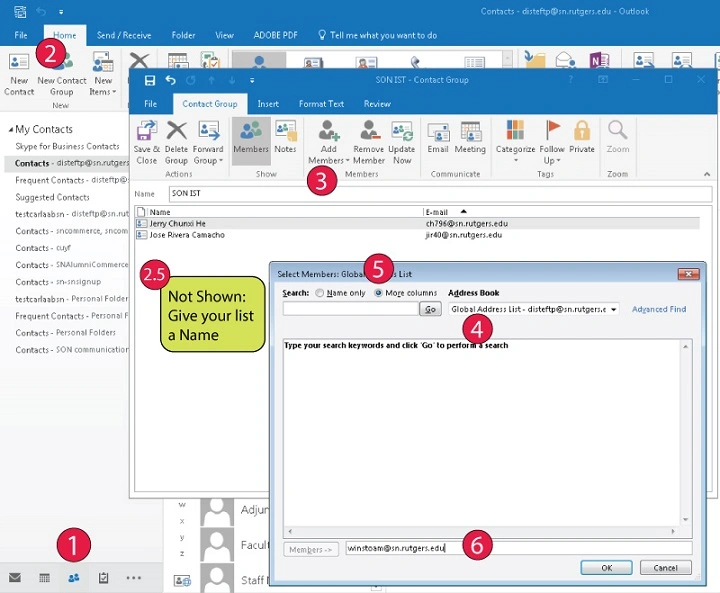
Step 1: Open Outlook
Start Outlook like normal.
Step 2: Go to People or Contacts
Look at the bottom-left corner.
You’ll see stuff like:
Mail
Calendar
People
Click People.
Step 3: Create a New Contact Group
Now find “New Contact Group” and click it.
A new window pops up.
Step 4: Name Your Group
Pick something simple and clear.
Like:
Office Team
Family Group
Sales Clients
Study Group
Good names help you later.
Step 5: Add Members
Now click “Add Members”
You can add people from:
Your Outlook contacts
Address book
Type new email addresses
Step 6: Save the Group
Once you’ve added everyone, click Save & Close.
Done! Your group is ready.
How to Send an Email to Your Outlook Group
This part’s super easy now.
Steps
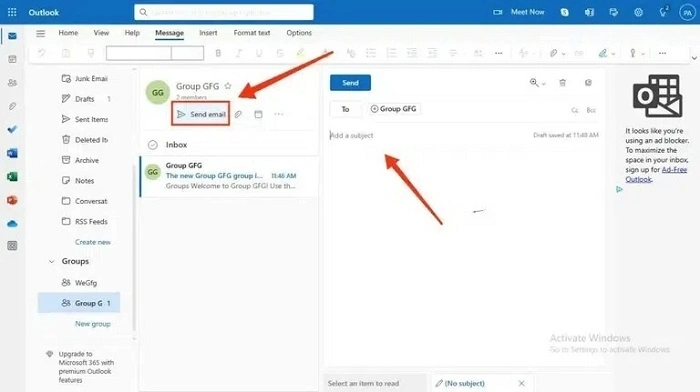
Open a new email. Type your group name in the To box. Pick the group. Write your email. Hit send.
Outlook sends it to everyone.
Pretty cool, right?
How to Create an Email Group in Outlook Web
Using Outlook in your browser? No problem at all.
Steps
Open Outlook Web. Go to the People part. Click New Contact List. Name your group. Add email addresses. Save it.
Simple as that.
Outlook Web vs Desktop Differences
Both work pretty much the same.
But desktop Outlook usually has more fancy options. Better tools to manage stuff. Extra ways to customize.
Still, web Outlook works great for most folks.
Can You Edit an Outlook Email Group Later?
You bet.
Groups are easy to change anytime.
You can add new people. Remove folks. Change the group name. Update email addresses.
Very flexible.
How to Add New Members to a Group
Need to add someone later? Easy peasy.
Steps
Open Contacts. Find your group. Open it up. Click Add Members. Save your changes.
All done.
How to Remove Members From a Group
Same basic idea.
Steps
Open the group. Pick the person. Click Remove Member. Save the group.
It takes just seconds.
Can Group Members See Each Other?
Usually yes.
When you send emails the normal way, people might see everyone else.
Want to keep it private? Use BCC instead.
Should You Use BCC With Outlook Groups?
Sometimes yes.
Great for customer lists. Big mailing lists. Public events. Private stuff.
BCC hides email addresses from each other.
Very handy.
Can Outlook Groups Include External Emails?
Yep!
You can add Gmail addresses. Yahoo emails. Work emails. School accounts.
Doesn’t have to be just Outlook.
How Many People Can Be in an Outlook Group?
Depends on your Outlook type and account.
Most groups can handle lots of contacts though.
Work accounts often let you add more people.
Can You Create Multiple Groups?
Of course!
Lots of folks make different groups. Work groups. Friend groups. Client groups. School groups. Family groups. Project groups.
Keeps things nice and organized.
Common Problems When Creating Outlook Groups
People hit snags sometimes.
Missing Contacts
Sometimes folks aren’t saved right first.
Sync Problems
Web and desktop might sync slowly.
Wrong Email Addresses
Typos make emails bounce back. Always check contacts twice.
Sending to Wrong Group
Similar names can mix you up. Use clear names to avoid this.
Best Practices for Outlook Email Groups
Want to keep your groups tidy? Try these tips.
Use Clear Group Names
Skip confusing titles.
Update Groups Regularly
Remove old contacts who left.
Double-Check Before Sending
Really important for big groups.
Use BCC When Needed
Keep things private.
Organize Similar Groups Together
Helps avoid mix-ups.
Can Outlook Groups Save Time at Work?
Oh yeah, tons of time.
Really helpful if you email the same people daily.
Instead of typing 20 addresses each time? You type one group name.
Huge time saver for sure.
Outlook Groups for Businesses
Companies use Outlook groups all the time.
Great for teams. Sales folks. HR stuff. Project work. Customer help.
Groups make work emails way simpler.
Can You Share Outlook Groups With Others?
Sometimes yes.
Works best in offices using Microsoft Exchange or Microsoft 365.
Shared groups help teams stay in touch.
Difference Between Microsoft 365 Groups and Contact Groups
These are different things.
Contact Groups
Just simple email lists.
Microsoft 365 Groups
Way more advanced.
They can have shared inboxes. Calendars. Files. Team stuff.
Much bigger tools for working together.
Can Outlook Groups Receive Replies?
Yes they can.
When you email a group, people can reply like normal.
Based on settings, replies might go just to you. Or to everyone in the thread.
Watch out for Reply All storms!
Are Outlook Groups Private?
Usually yes, in your own account.
But if you share groups at work? IT folks might see them based on company rules.
Can Groups Help Reduce Email Mistakes?
For sure.
Groups cut down on forgotten people. Typing errors. Missing team members.
Much safer overall.
Can You Delete Outlook Groups?
Yep, easy.
Steps
Open Contacts. Pick the group. Delete it.
Simple as that.
Deleting a group doesn’t delete the actual contacts. Big difference to remember.
Can You Use Outlook Groups on Mobile?
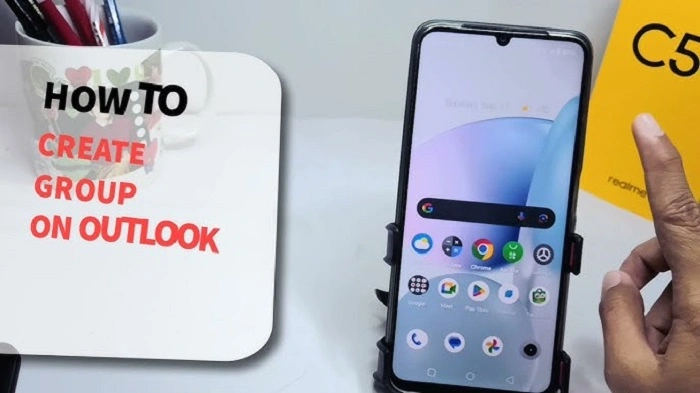
Yes you can.
Outlook phone apps support groups too.
Though computer versions are usually easier to manage.
Also Read: If I Forward an Email, Who Can See It? Everything You Need to Know
Outlook Mobile Features
You can often see groups. Send emails. Manage contacts.
Super handy when you’re out and about.
Common Mistakes With Email Groups
People mess this up all the time.
Forgetting BCC
Now everyone sees everyone’s email. Gets awkward fast.
Sending Sensitive Information
Always check who’s getting your email.
Outdated Groups
Old employees or contacts stay in by mistake.
Similar Group Names
Easy way to email the wrong folks.
How to Stay Organized With Outlook Groups
Good setup matters a lot.
Use Categories
Color-code groups when you can.
Remove Old Contacts
Keep groups clean and fresh.
Rename Confusing Groups
Clear names help tons.
Test Large Groups First
Really important for big emails.
FAQs
What is an Outlook email group?
A saved bunch of contacts you can email together fast.
Can I edit Outlook groups later?
You bet you can.
Can recipients see each other?
Usually yes unless you use BCC.
Can Outlook groups include Gmail addresses?
Yep, no problem.
Are Outlook groups free?
Yes, they come with Outlook accounts.
Can I delete a group without deleting contacts?
Yes. Contacts stay saved on their own.
Is Outlook Web different from desktop Outlook?
A bit, but both handle groups fine.
Can I use Outlook groups on my phone?
Usually yes with the Outlook app.
Learning to make email groups in Outlook? Makes email life way easier.
It saves time. Cuts mistakes. Keeps things tidy.
Once you start using groups often, you’ll wonder why you waited so long.
Because typing the same 15 email addresses over and over?
Yeah… nobody likes doing that.
