

Hey there! Let’s talk about email security. Email is still the main way hackers get in. Even now in 2026, bad guys keep sending fake emails to steal your info. They’re getting smarter too. Old email tools? They use the same old rules and patterns. The problem is, hackers don’t play by rules anymore.
Here’s where Abnormal Email Security comes in. Instead of just looking for known bad stuff, Abnormal watches how people actually talk to each other. It uses AI (which means smart computer tech) to learn your team’s normal email habits. Then it spots emails that seem… off. I’ll show you what Abnormal is, how it works, what bad stuff it stops, and why it’s become such a big deal in 2026.
What Is Abnormal Email Security?
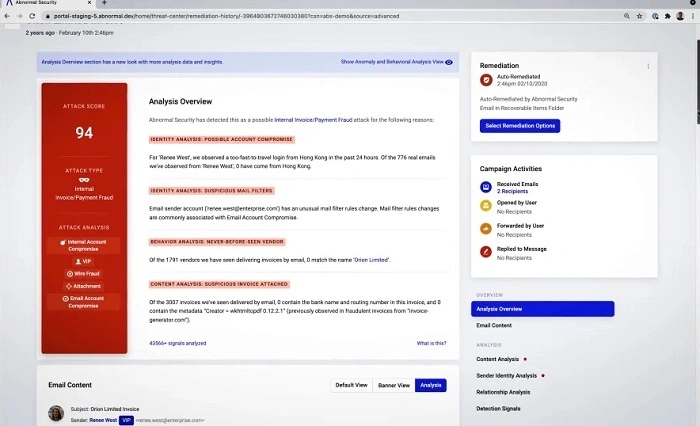
Okay, so Abnormal is this cloud-based email guard that uses AI to catch sneaky email attacks. But here’s the cool part – it doesn’t just scan for bad links or files. It looks at how people behave, what they mean, and the whole context.
The platform learns your company’s email style. Who emails who? How often? What do they talk about? What tone do they use? When something doesn’t match up, Abnormal goes “Hey, that’s weird!” and flags it.
This way, it catches stuff that old tools totally miss.
Why Old Email Security Just Doesn’t Cut It
Look, those old email tools were built for simpler times. Sure, they block spam and known viruses. But today’s attacks? Way different.
Hackers now use trust and urgency to trick you. Many bad emails have zero links. No files. No viruses. Nothing obvious at all.
These attacks look totally normal. That’s why rule-based systems fail so hard.
The Main Problem Abnormal Fixes
Abnormal asks one simple question: Does this email act normal?
Instead of checking if an email matches some bad-guy list, Abnormal checks if it matches how your team usually talks.
This shift in thinking? Game changer. It catches threats that slip right past old defenses.
How Abnormal Email Security Works
Abnormal plugs right into cloud email like Microsoft 365 and Google Workspace. You don’t need to mess with mail flow or MX records (those are email routing things).
Once it’s connected, it starts learning from your past emails to figure out what’s normal.
The AI Brain Behind It All
At its core, Abnormal has this smart AI that learns patterns like:
- who emails who regularly
- how people write and their tone
- when folks usually reply
- normal money and work stuff
- trusted vendors you work with
- what topics come up often
When an email breaks these patterns? Abnormal spots it.
Catching Bad Stuff in Real Time
Here’s something neat – Abnormal checks emails both before AND after they land in your inbox. This helps catch attacks that change over time.
Like, an email might seem fine at first. But then comes a follow-up asking for money. Abnormal tracks these conversations.
What Kind of Threats Does Abnormal Stop?
Abnormal is built to stop those tricky email attacks that sneak past normal filters.
Boss Impersonation Scams (BEC)
These attacks fake being your CEO or vendors to trick employees into sending money or secrets.
Abnormal rocks at catching these. It spots weird requests, different writing styles, or when the sender acts strange.
Fake Vendor Bills
Hackers love pretending to be your suppliers. They ask for payment changes or rush transfers. These emails often look perfect with zero bad content.
Abnormal catches vendor fraud by knowing how your real vendors act. Then it spots the fakes.
Sneaky Phishing (No Links!)
Many new phishing emails have nothing obvious in them. Just pure trickery.
Abnormal catches these by reading between the lines. It looks at what they want, how they write, and weird behavior.
Hacked Account Attacks
What if a real coworker’s account gets hacked? Old tools trust it. Abnormal doesn’t.
It notices when trusted accounts act weird. Like sending emails they never sent before.
Payroll and HR Scams
Fake requests for W-2 forms, bank changes, or employee info are super common.
Abnormal knows when these requests don’t match normal HR emails.
Also Read: Chop Email
What Makes Abnormal Different?
Abnormal isn’t just another spam filter. It thinks totally different.
No Rules, No Lists
Abnormal doesn’t need static rules or bad-guy lists. This lets it catch brand-new attacks nobody’s seen before.
It Gets Context
Every email gets checked with full context. Past chats, relationships, how your company works – all of it matters.
Built for the Cloud
Abnormal was made for cloud email. It fits right in without messing up your mail flow.
After-the-Fact Protection
Some attacks only show their true colors later. Abnormal keeps watching and can yank bad emails even after delivery.
Super Easy to Set Up
One of the best things? Setting up Abnormal is a breeze.
Companies can add it in minutes. No DNS changes. No routing email through other servers.
Works With
- Microsoft 365
- Google Workspace
Perfect for modern cloud-first teams.
How Abnormal Handles Alerts
Abnormal keeps things simple. Instead of drowning you in alerts, it gives you the ones that matter.
Clear Alert Info
Each alert tells you exactly why an email got flagged. Your security team gets it right away without digging deep.
Auto-Cleanup
Abnormal can remove bad emails from inboxes by itself. Faster response, fewer mistakes.
Way Fewer False Alarms
Since Abnormal understands behavior, it doesn’t cry wolf as much as old tools.
Who Uses Abnormal?
Abnormal is popular across industries where email fraud hurts most.
Common Users
- banks and finance companies
- hospitals and clinics
- tech companies
- law firms
- schools and universities
- companies with remote workers
Really, any company that relies on email can benefit.
Why Abnormal Rocks in 2026
As email threats evolve, Abnormal’s AI approach just gets better.
Better Threat Catching
Abnormal finds attacks that old tools miss. Especially the tricky social ones.
Saves Money
By stopping fake invoices and wire scams, companies avoid losing big bucks.
Less Work for Security Teams
Fewer false alarms mean your security folks waste less time checking good emails.
People Trust It More
Employees like it because it doesn’t block their real emails all the time.
Helps You Stay Legal
Stopping email breaches helps companies meet rules and stay out of trouble.
Abnormal vs Old Email Gateways
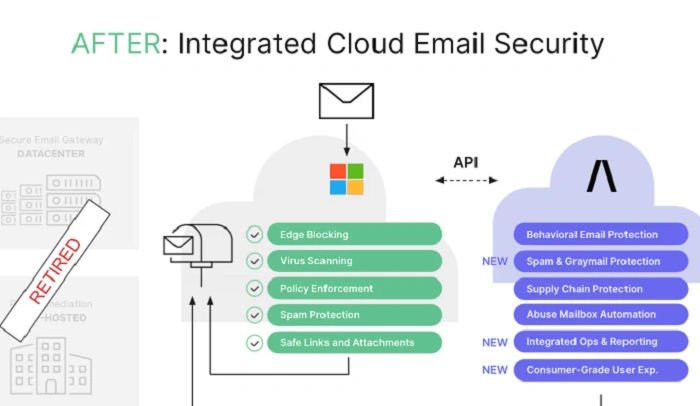
Old gateways scan stuff at the border. Abnormally understands behavior inside your company. This difference? Huge. Modern attackers skip the border entirely.
Things to Know
Abnormal is powerful, but it’s not meant to replace everything.
It works best alongside your existing email tools. Not instead of them.
You still need layers of security.
Tips for Using Abnormal
Want the most from Abnormal? Try these:
Train Your People Too
Even great tools work better when your team knows what to watch for.
Check Alerts Often
Security teams should review flagged emails. Helps the system learn better.
Keep Vendor Info Fresh
Updated vendor records help Abnormal be more accurate.
Why Everyone’s Talking About Abnormal
In 2026, email threats aren’t just about viruses. They’re about lies, trust, and tricking humans.
Abnormal gets how people communicate. That’s why it works so well against modern attacks. As hackers adapt, our tools need to adapt too.
Is Abnormal Worth Your Money?
For companies facing smart email attacks? Absolutely. It cuts risk, saves time, and makes everything safer.
Its AI-first approach matches how attacks actually work today.
Quick Recap
Abnormal Email Security uses AI to protect you from advanced email threats. It understands behavior instead of using old static rules.
It’s great at stopping boss impersonation, fake vendors, hacked accounts, and tricky phishing. Works seamlessly with cloud email. Strong protection without the hassle.
Frequently Asked Questions (FAQs)
What is Abnormal Email Security?
It’s an AI email guard that spots weird communication to stop advanced attacks.
Does it replace my current email security?
Nope. It works with your existing tools to catch what they miss.
Can it catch hacked internal accounts?
Yep! It notices when trusted accounts act strange.
Is it hard to set up?
Not at all. Setup is fast and doesn’t mess with email routing.
Why does it work so well against phishing?
Because it looks at intent and behavior. Not just links or files.
