
Ever delete an email and then immediately panic? Yeah. Happens to basically everyone.
Maybe it was:
- An important work message
- Flight details
- A receipt
- School information
- Photos
- Or honestly just the wrong email by mistake
Then suddenly your brain goes:
“Wait… where did it go?”
“Can I get it back?”
“Did it disappear forever?”
Email deletion sounds simple at first.
You hit the trash icon. Done.
But honestly?
Deleting emails is way more confusing than people think.
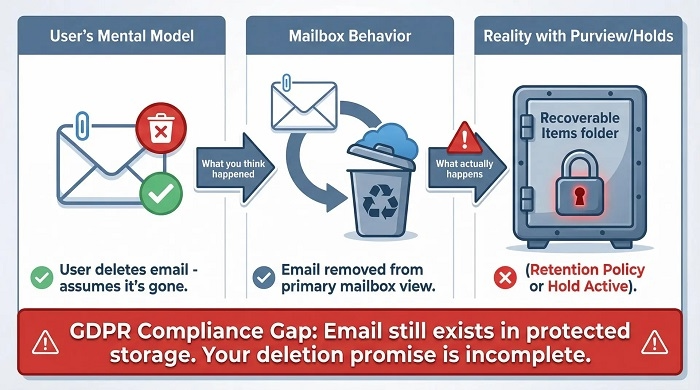
Because most email apps don’t actually erase emails immediately.
Instead:
- They move them
- Store them temporarily
- Sync changes across devices
- Keep backups sometimes
Which means deleted emails often stick around longer than you’d expect. Let’s break down exactly how email deletion works and what really happens after you hit delete.
Can You Delete an Email?
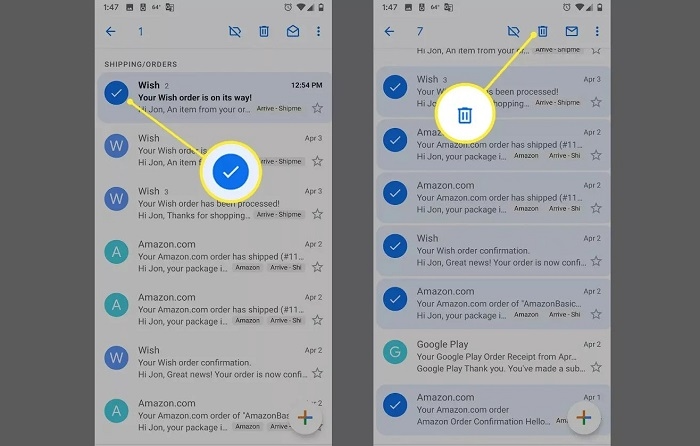
Yep. Absolutely.
Every major email service lets you delete emails.
Including:
- Gmail
- Outlook
- Yahoo Mail
- Apple Mail
Deleting removes emails from your inbox or folders.
But here’s the important part:
Deleting doesn’t always mean permanently gone immediately.
What Happens When You Delete an Email?
Usually the email moves to:
- Trash
- Deleted Items
- Bin
- Junk folder sometimes
Basically a temporary holding area.
Most email providers keep deleted emails there for a while before permanent removal.
Why Email Apps Don’t Permanently Delete Right Away
Honestly?
Because people make mistakes constantly.
Everyone accidentally deletes:
- Important messages
- Attachments
- Work emails
- Receipts
- Conversations
Trash folders act like safety nets.
Very useful honestly.
Where Deleted Emails Go in Gmail
Gmail usually moves deleted emails to:
Trash.
Emails stay there for:
about 30 days.
After that?
Google permanently removes them automatically.
Where Deleted Emails Go in Outlook
Microsoft Outlook uses:
Deleted Items folder.
Same idea honestly.
Deleted emails stay temporarily before permanent cleanup.
Where Deleted Emails Go in Yahoo Mail
Yahoo also uses:
Trash folder.
Usually emails remain there for a limited time before disappearing permanently.
What About Apple Mail?
Apple Mail depends on which email provider you’re using.
Could be:
- Gmail Trash
- iCloud Trash
- Outlook Deleted Items
Apple Mail mostly syncs with provider settings.
Can You Recover Deleted Emails?
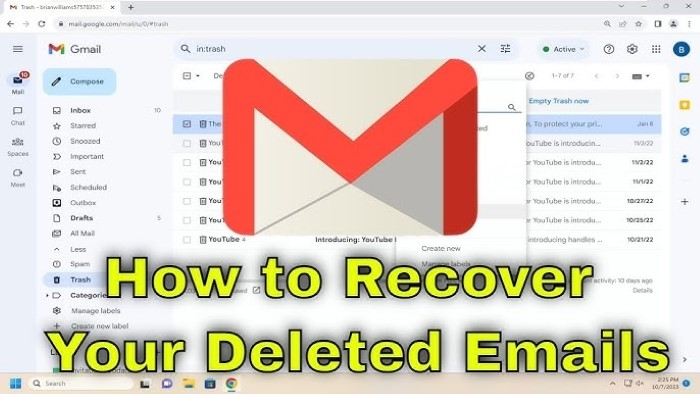
Usually yes.
As long as they still sit inside:
- Trash
- Deleted folder
- Recovery section
Very common honestly.
How to Recover Deleted Emails in Gmail
Usually:
- Open Trash
- Find email
- Move it back to Inbox
Easy process.
How to Recover Deleted Emails in Outlook
Usually:
- Open Deleted Items
- Right-click email
- Restore or move back
Pretty simple.
Can Permanently Deleted Emails Be Recovered?
Sometimes yes.
Sometimes no.
Depends on:
- Provider
- Backup systems
- Time passed
- Account type
Personal accounts often lose permanently deleted emails forever eventually.
Business systems may keep backups longer.
What Does “Permanently Delete” Mean?
Usually it means:
- Email removed from visible folders
- Trash emptied
- Email scheduled for server removal
But honestly?
Copies sometimes still exist in backups for a while.
Can You Delete Sent Emails?
Yep.
You can delete emails from:
Sent folder.
But here’s the important thing:
Deleting your sent email usually only deletes your copy.
The recipient still keeps theirs.
Does Deleting an Email Unsend It?
Usually no.
This confuses people constantly.
Once someone receives your email:
- Their copy remains
- Your delete button can’t remove it
Only special features like:
- Gmail Undo Send
- Outlook Recall
may stop delivery temporarily.
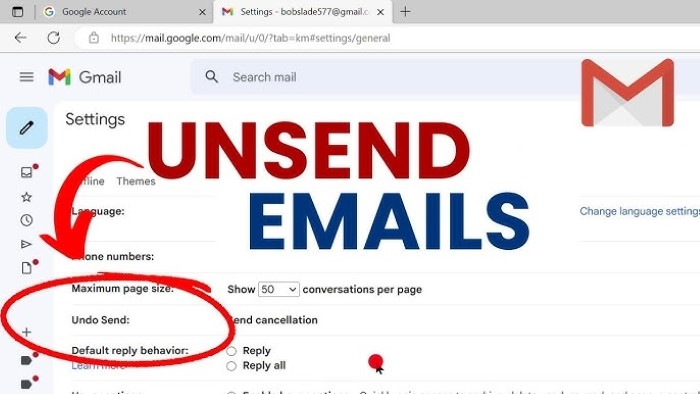
What Is Gmail Undo Send?
Gmail has a feature called:
Undo Send.
But honestly?
It doesn’t truly “unsend” emails.
Instead Gmail delays sending for a few seconds.
If you click Undo fast enough:
- Email stops before leaving
Very useful honestly.
Outlook Recall Explained
Outlook has:
Recall This Message.
But it only works sometimes.
Usually requires:
- Same company email system
- Microsoft Exchange
- Recipient not opening email yet
Not reliable honestly.
Can Someone Tell If You Deleted Their Email?
Nope.
Deleting emails is private normally.
People won’t get notifications saying:
“This email was deleted.”
Can Employers Recover Deleted Work Emails?
Often yes.
Companies commonly keep backups for:
- Legal reasons
- Security
- Compliance
- Record keeping
Work emails are rarely fully gone immediately honestly.
Why Businesses Keep Email Backups
Businesses archive emails constantly.
Especially:
- Banks
- Healthcare companies
- Government offices
- Law firms
Emails may stay stored for years.
Can Deleted Emails Still Exist on Servers?
Sometimes yes.
Even after deletion:
- Backups may remain
- Archived systems may exist
- Cloud copies may survive temporarily
Especially business accounts.
Can Hackers Recover Deleted Emails?
Usually not easily.
But weak security creates risks honestly.
Always use:
- Strong passwords
- Two-factor authentication
- Secure devices
Very important.
What Happens When You Empty Trash?
Emptying trash usually:
- Permanently removes visible copies
- Clears deleted folder
After this, recovery becomes much harder.
Can You Delete Multiple Emails at Once?
Absolutely.
Most email apps let you:
- Select many emails
- Bulk delete
- Empty entire folders
Huge time saver honestly.
How to Delete All Emails Quickly
Most services offer:
- Select All
- Delete buttons
- Cleanup tools
Useful for spam or cluttered inboxes.
Can Deleted Emails Sync Across Devices?
Yep.
Modern email apps sync constantly.
Delete email on:
- Phone
- Laptop
- Tablet
…and it often disappears everywhere else too.
What Is Email Archiving?
Archiving is different from deleting.
Delete
Moves email toward removal.
Archive
Hides email while keeping it saved.
Very common in Gmail honestly.
Why People Archive Instead of Delete
Because emails may still matter later.
The archive keeps the inbox clean without losing information.
Very useful honestly.
Common Reasons People Delete Emails
People clean inboxes constantly.
Usually for:
- Spam
- Promotions
- Old messages
- Privacy
- Storage space
- Organization
Modern inboxes get messy fast honestly.
Can Deleting Emails Save Storage Space?
Yep sometimes.
Especially if emails contain:
- Huge attachments
- Photos
- Videos
Deleting large emails frees storage.
Can You Delete Email Attachments Only?
Some providers allow this.
Others don’t.
Usually easier to:
- Download attachment
- Save locally
- Delete original email
What Happens to Email Threads When One Message Is Deleted?
Depends on the provider.
Sometimes:
- Entire thread stays
- Only one message disappears
Conversation systems vary honestly.
Can You Automatically Delete Emails?
Yep.
Most providers support rules or filters.
Useful for:
- Spam
- Promotions
- Notifications
- Old emails
Automatic cleanup saves tons of time honestly.
Common Email Deletion Mistakes
People mess this up constantly.
Deleting Wrong Emails
Classic mistake honestly.
Emptying Trash Too Fast
Recovery becomes difficult afterward.
Deleting Attachments Accidentally
A very common problem.
Confusing Archive With Delete
Happens constantly in Gmail.
Best Practices Before Deleting Emails
Want safer inbox cleanup?
Do this stuff.
Double-Check Important Emails
Especially receipts or work info.
Backup Important Attachments
Save locally first.
Archive Instead of Delete Sometimes
Safer honestly.
Empty Trash Carefully
Once gone, recovery gets harder.
Use Search Before Deleting
Avoid accidental mistakes.
FAQs About Deleting Emails
Can you delete an email?
Yep, absolutely.
Where do deleted emails go?
Usually Trash or Deleted Items folders.
Can deleted emails be recovered?
Usually yes if still in Trash.
Does deleting an email unsend it?
Usually no.
Can recipients still see deleted emails?
Yep if they already received them.
How long do deleted emails stay in Trash?
Often around 30 days depending on the provider.
Can employers recover deleted work emails?
Often yes.
Is archiving the same as deleting?
Nope. Archive keeps emails stored safely. Deleting emails sounds simple at first. But honestly? Most email systems don’t instantly erase messages forever.
Instead they usually:
- Move emails to Trash
- Keep temporary backups
- Sync across devices
- Store archives for safety
Which honestly saves people all the time after accidental deletions. And while deleting helps keep inboxes clean… It’s always smart to double-check before removing important emails permanently. Because once some emails are truly gone? Getting them back can become really difficult.
