
Choosing the right email client can improve productivity, streamline communication, and offer better customization. Two popular options are eM Client and Thunderbird. This guide compares their features, usability, and performance to help you decide which one suits your needs.
Overview of eM Client

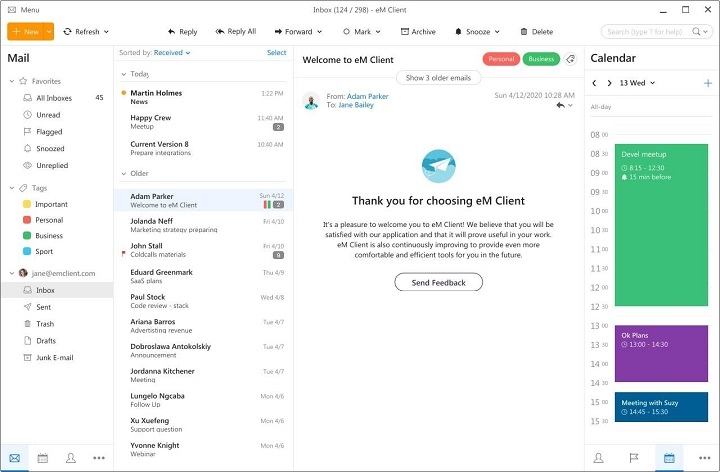
eM Client is a modern email client designed for Windows and macOS users, offering email, calendar, contacts, and chat functionalities.
Key Features:
- Supports IMAP, POP3, Exchange, Gmail, iCloud, and more.
- Integrated Calendar and Task Management.
- Contact Management with categorization.
- Built-in chat (XMPP, Google Chat).
- PGP & S/MIME encryption.
- Modern, customizable interface.
Pros:
- User-friendly, sleek design.
- Excellent integration with Microsoft services.
- Calendar and contact sync.
- PGP encryption support.
Cons:
- Free version limited to two accounts.
- Some features are locked behind a paid license.
Overview of Thunderbird
Thunderbird is a free, open-source email client developed by Mozilla. It is highly customizable and supports various extensions.
Key Features:
- Supports IMAP, POP3, Gmail, Yahoo, Exchange via plugins.
- Built-in Calendar via Lightning extension.
- Advanced filtering and search.
- Large add-on ecosystem.
- PGP encryption support via Enigmail.
- Available on Windows, macOS, Linux.
Pros:
- Completely free and open-source.
- Highly customizable with themes and extensions.
- Supports unlimited email accounts.
- Strong community support.
Cons:
- Interface is a bit outdated.
- Setup may require technical knowledge.
eM Client vs Thunderbird: Feature Comparison
| Feature | eM Client | Thunderbird |
| Platforms | Windows, macOS | Windows, macOS, Linux |
| Pricing | Free (2 accounts), Paid License | Completely free |
| Calendar & Tasks | Built-in | Requires extension |
| Contact Management | Built-in | Requires plugins/extensions |
| Interface | Modern, user-friendly | Slightly outdated, customizable |
| Encryption | PGP & S/MIME | PGP via extensions |
| Customization | Limited themes | Extensive with add-ons |
| Account Support | IMAP, POP3, Exchange, Gmail, iCloud | IMAP, POP3, Gmail, Exchange (via plugin) |
| Add-on Support | Minimal | Extensive |
Which One Should You Choose?

- Choose eM Client if:
- You prefer a modern, intuitive interface.
- You use Microsoft services and need seamless integration.
- You need a built-in calendar, tasks, and contact sync.
- You are okay with paying for extra features.
- Choose Thunderbird if:
- You want a free, open-source solution.
- You prefer extensive customization and add-ons.
- You need to manage multiple email accounts without restrictions.
- You are comfortable with technical setup and extensions.
FAQs About eM Client vs Thunderbird
Is Thunderbird really free?
Yes, Thunderbird is completely free and open-source with no account limitations.
Can eM Client handle multiple email accounts?
The free version supports up to two accounts. The paid version removes this limit.
Which client is better for encryption?
Both support PGP encryption, but Thunderbird requires additional extensions like Enigmail.
Can I use either client on Linux?
Thunderbird supports Linux; eM Client does not.
Which one is easier for beginners?
eM Client offers a more user-friendly interface, ideal for beginners.
Both eM Client and Thunderbird are powerful email clients catering to different user preferences. If you want a modern, easy-to-use interface with built-in features, eM Client is ideal. For those who prefer a free, highly customizable solution with strong community support, Thunderbird is the better choice.
