
Hey there! A tiny chunk of text at the bottom might seem unimportant, yet it quietly shapes how others see you. When reaching out about jobs, deals, help tickets, or new contacts, that little block of details carries weight beyond its pixels. Few notice it directly – still, it sticks in memory longer than expected.
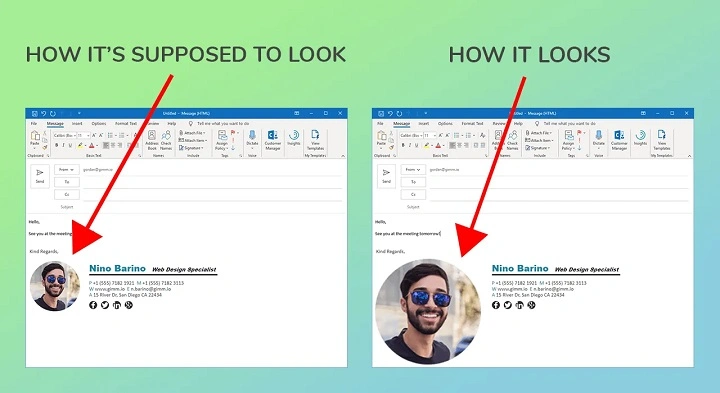
Too big a signature might mess up how an email appears. It could wreck the design when viewed on phones. Some email programs may struggle to display it correctly.
Most folks wind up typing “email signature size” into a search bar. It pops up again and again. People just want it to fit without spilling over. Too big causes clutter, too small gets ignored. So they look. Again. And then once more
Desktops still see email traffic in 2026 – so do laptops, tablets, yet phones dominate. That means signatures must adapt sharply, staying clear across screens big and small.
Surprisingly, most people overlook how big an email signature should be. Picture this: a clean layout that fits without scrolling. Think small images – under 100 KB – and width held around 600 pixels. Fonts? Stick near 10 to 12 points so they stay readable. On phones, things shift; stacked elements work better than side-by-side boxes. Watch out for too many icons or social links crowding the space. Some folks add animated GIFs – that rarely helps. Others forget alt text for logos when images fail. A solid one keeps it short, clear, yet complete.
What Is Email Signature Size?
Email signature size refers to the overall dimensions and spacing of the signature section at the bottom of an email.
This includes:
- width
- height
- font size
- image/logo size
- icon dimensions
- spacing between lines
The goal is to keep the signature professional, readable, and easy to view on all devices.
A signature that is too large may overwhelm the email.
A signature that is too small may be hard to read.
Balance is important.
Why Signature Size Matters
The size of an email signature directly affects readability and professionalism.
A properly sized signature helps with:
- better readability
- professional branding
- mobile compatibility
- faster loading
- clean layout
In business communication, the signature is often the final impression.
That is why it needs to look polished.
Ideal Width for Email Signature
The recommended width for most email signatures in 2026 is:
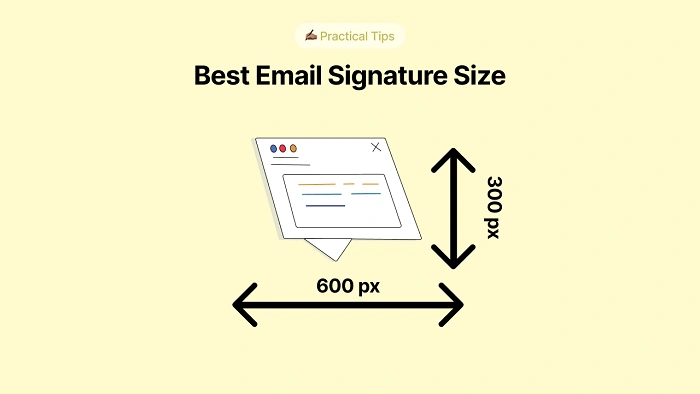
500–650 pixels
This range works well across most email clients.
A common professional size is:
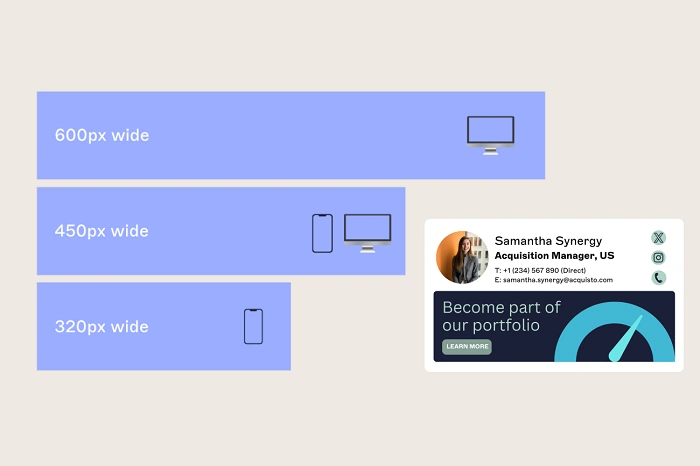
600 pixels wide
This width looks clean on desktop screens and still fits well on mobile layouts.
Going beyond 650 pixels may cause wrapping issues.
Ideal Height for Email Signature
The recommended height is usually:
100–200 pixels
For signatures with only text, height can be much smaller.
For signatures with logos and icons, 150 pixels is often ideal.
Avoid signatures taller than 250 pixels.
Large signatures make emails unnecessarily long.
Best Font Size for Email Signatures
Font size is just as important as overall dimensions.
Recommended sizes:
- 12px to 14px for name and designation
- 11px to 12px for contact details
- 10px to 11px for disclaimers
These sizes keep the signature readable.
Anything smaller may be hard to read on phones.
Anything larger may look bulky.
Best Logo Size in Email Signature
If you use a company logo, keep it proportional.
Recommended logo size:
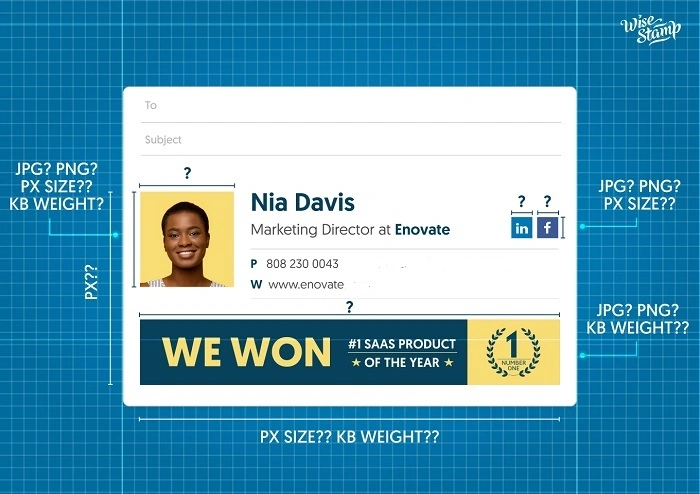
100–150 pixels wide
Height should adjust proportionally.
For example:
120 x 60 px
This works well for most brand logos.
A logo that is too large can dominate the signature.
Social Media Icon Size
Many signatures now include social icons.
Examples include:
Recommended icon size:
16px to 24px
The most common size is:
20px x 20px
This looks clean and professional.
Recommended Signature Layout
A simple structure works best.
Example layout:
Name
Job title
Company
Phone
Email
Website
Social icons
This layout keeps it easy to scan.
Text-Only Signature Size
For text-only signatures, the height is usually smaller.
Example:
width: 500px
height: 70–100px
Text-only signatures often look more professional and faster-loading.
Image-Based Signature Size
Some people use full banner-style signatures.
These may include:
- photo
- logo
- CTA button
- promotional banner
Recommended size:
600 x 150 px
Try not to exceed this.
Large images may not load well.
Mobile-Friendly Signature Size
In 2026, many users open emails on phones.
This makes mobile responsiveness extremely important.
A mobile-friendly signature should:
- fit within screen width
- use readable fonts
- avoid oversized logos
- stack content vertically if needed
A width of around 320–400px responsive display works well.
Best File Size for Images
This is different from dimensions.
The image file itself should remain lightweight.
Recommended file size:
under 100 KB
Large files slow email loading.
Compressed PNG or JPG works well.
Why Oversized Signatures Are Bad
A very large signature causes several problems.
These include:
- slower loading
- mobile layout issues
- overwhelming appearance
- spam-like look
Large banners may even trigger spam filters.
This is especially true in 2026.
Best Signature Design Practices
Keep It Clean
Avoid adding too many elements.
Simple designs work best.
Use Clear Hierarchy
The name should be the most prominent part.
Then title.
Then contact information.
Use Limited Colors
Too many colors reduce professionalism.
Keep White Space
Proper spacing improves readability.
Should You Add a Photo?
This depends on the purpose.
Professional service providers often use small profile photos.
Recommended size:
60 x 60 px
Round profile images are common.
Avoid large photos.
Email Client Compatibility
Different email platforms display signatures differently.
Popular platforms include:
- Gmail
- Outlook
- Apple Mail
Testing on multiple platforms is important.
Common Mistakes to Avoid
Some common mistakes include:
- oversized logos
- huge fonts
- too many icons
- promotional banners that dominate
- too much text
Keep it concise.
Example Professional Signature Size
A standard business signature may use:
- width: 600px
- height: 120px
- logo: 120x60px
- icons: 20x20px
- font: 12px
This is a balanced format.
Why This Matters in 2026
Because teams now split time between home and office, how you sign an email shapes how others see you. Not just a formality – it quietly tells people who you are.
Trust grows when a signature looks neat. Credibility gets stronger with simplicity in how it appears.
Size holds weight because of how things fit together. When it does not match, parts fail to connect right.
Quick Wrap-Up
The ideal email signature size is usually:
- width: 500–650px
- height: 100–150px
- font: 11–14px
- icons: 20x20px
A fresh look helps, yet simplicity matters just as much. Smooth function across devices is key but clarity wins every time. Sharp design stands out while avoiding clutter keeps it real.
FAQs
What is the ideal email signature width ?
Usually 500–650 pixels.
What is the best font size ?
12px to 14px works best.
How big should the logo be ?
Around 100–150px wide.
Should signatures work on mobile ?
Yes, this is very important in 2026.
Can oversized signatures be bad ?
Yes, they may cause layout and loading issues.
