
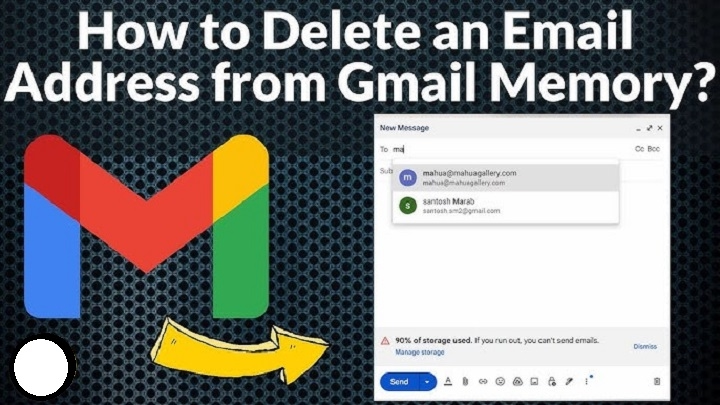
Sometimes you need to remove an email address from Gmail — maybe it’s an old account you no longer use, a school account that expired, a work account from a previous job, or a secondary account you don’t want synced anymore. The problem is that Gmail spreads your account across devices, browsers, and Google services. So deleting an email address isn’t always obvious.
This 2025 guide shows you exactly how to remove a Gmail address from your phone, computer, Google account settings, autofill history, and even the Gmail app. Clean, simple, step-by-step.
Why You May Want to Delete an Email Address From Gmail

People remove Gmail accounts because:
- it’s an old account they no longer use
- they switched to a new email
- they don’t want multiple accounts logged in
- the inbox is full and unused
- a device is being sold or given away
- they want more privacy
- they want to remove autofill suggestions
- they need to unlink work or school email
Whatever the reason, deleting an address from Gmail gives you control and privacy.
Delete a Gmail Account From the Gmail App (Android)
Steps:
- open the Gmail app
- tap your profile picture (top right)
- tap “Manage accounts on this device”
- select the Gmail address you want to remove
- tap “Remove account”
- confirm removal
The account disappears instantly from the Gmail app.
Tip: This removes the Google account from your entire device, not just Gmail.
Delete a Gmail Address From Gmail App (iPhone)
Steps:
- open the Gmail app
- tap your profile picture
- tap “Manage accounts on this device”
- toggle off the email account OR
- tap “Remove from this device”
Your Gmail address is disconnected from the app immediately.
Remove Gmail Account From Google Settings (Android Devices)
If removing inside Gmail doesn’t work, use device settings.
Steps:
- open Settings
- scroll to Accounts
- tap Google
- choose the Gmail address you want to delete
- tap “Remove account”
- confirm
The email address is removed from Gmail, Play Store, Drive, and all linked apps.
Remove Gmail Account From Chrome Browser (Desktop)
If your email keeps appearing in Chrome:
Steps:
- open Chrome
- click your profile icon
- choose “Manage profiles”
- click the three dots on the profile you want gone
- click “Delete”
- confirm
This removes the Gmail account, history, and syncing.
Remove Gmail Account From Google Account Dashboard (Complete Removal)
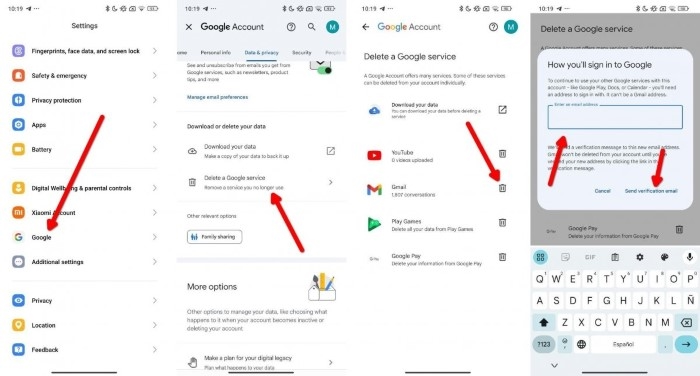
This method deletes the Gmail address entirely — permanently.
Steps:
- go to myaccount.google.com
- sign in
- click “Data & Privacy”
- scroll to “Delete your Google Account”
- enter your password
- choose the email address to delete
- follow instructions
- confirm deletion
Warning:
- deleting Gmail permanently removes all emails, data, access, and recovery options.
- you can keep your Google account but delete only Gmail if you follow the prompts.
Remove Saved Email Addresses From Gmail Autofill
If Gmail keeps suggesting old emails while composing messages:
Steps:
- open Gmail on desktop
- click Compose
- begin typing the unwanted email address
- when it appears, hover over it
- click the X button
- Gmail removes it instantly
Tip: This only deletes autofill suggestions, not the actual account.
Remove Email Address From Google Contacts
Sometimes addresses come from saved contacts.
Steps:
- go to contacts.google.com
- search for the email address
- click the contact
- click three dots → Delete
This removes unwanted autofill entries permanently.
Remove Gmail Address From iPhone Mail Settings
If your Gmail still appears in Apple Mail:
Steps:
- open Settings
- tap Mail
- tap Accounts
- choose Gmail
- tap Delete Account
- confirm
Your iPhone removes Gmail from Mail, Calendar, and Notes.
Remove Gmail From Windows Mail App
Steps:
- open Windows Mail
- click Settings (⚙️)
- click Manage Accounts
- click the Gmail account
- click Delete Account
- confirm
Outlook Mail disconnects the Gmail address instantly.
Remove a Gmail Address From Multiple Devices at Once
If you signed in on shared or old devices:
Steps:
- open myaccount.google.com
- click Security
- scroll to “Your devices”
- select a device
- click “Sign out”
- repeat for all unwanted devices
This signs your Gmail out everywhere without deleting the account.
Remove a Gmail Alias or Secondary Email
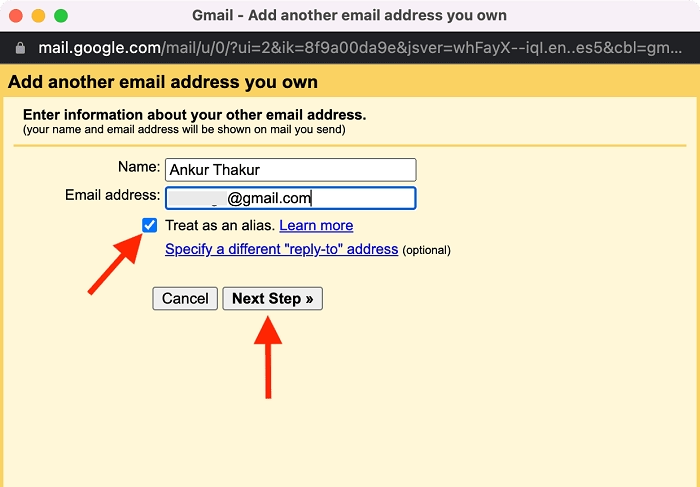
Steps:
- go to myaccount.google.com
- click Personal Info
- scroll to “Contact info”
- choose Email
- click the alternate email
- click Remove
Aliases disappear instantly.
Remove Gmail From Third-Party Apps
Steps:
- open myaccount.google.com
- click Security
- scroll to “Third-party apps with account access”
- select any app
- click Remove Access
This disconnects Gmail from outside apps.
Troubleshooting: Why Gmail Address Won’t Delete
Check if:
- the email is a work/school-managed account
- two-factor authentication is on
- the device has sync errors
- account removal is blocked by admin
- Chrome sync is still active
- backup options need updating first
Fix:
- turn off sync
- restart device
- update password
- sign out of all sessions
- disable Find My Device (Android only)
Most deletion issues come from Google sync settings.
Organization Tips After Removing a Gmail Address
After deleting:
- remove account from password managers
- clear browser cookies
- disable auto-sync
- update recovery email
- remove account from apps
- check if Drive files need transfer
- update other accounts linked to that email
Cleaning up prevents login errors or lost access later.
Quick Summary
How to delete an email address from Gmail:
- Gmail app → Manage accounts → Remove account
- Android Settings → Accounts → Google → Remove
- Chrome profiles → Delete profile
- Google Account → Delete Gmail
- Remove autofill suggestions
- Remove from Google Contacts
- Remove from device mail apps
- Sign out of old devices
- Unlink from apps and services
Two steps and the Gmail address is gone.
FAQs
Does removing a Gmail account delete emails?
Removing from device: no.
Deleting Gmail from Google account: yes, permanently.
Can I delete only Gmail but keep Google services?
Yes — Google gives you the option during deletion.
Can I bring a deleted Gmail address back?
Only sometimes, and only within a short window. Not guaranteed.
Why does my old Gmail still appear in suggestions?
Because it is saved in autofill or Google Contacts.
Will deleting Gmail remove Google Photos or Drive?
No, unless you delete your entire Google account.
