
We’ve all been there, right? You hit send on an email. Then instant panic hits you hard. Maybe you sent the wrong file. Maybe you typed something dumb. Maybe you sent it to your boss instead of your buddy. Your heart drops. Your hands get sweaty. And then you think: “Wait! If I delete this right now, will it vanish for them too?” Look, this confuses tons of people. Email is weird like that. You’d think deleting means gone forever. But nope. Email doesn’t work that way. Let me break down what really happens when you delete sent emails. Plus I’ll show you how to actually unsend them. And share tips to avoid these mess-ups.
What Happens After You Send an Email?

When you click send, stuff happens fast. First, your email app grabs the message. Then it shoots through servers. Like, lots of servers all over. Finally, it lands in their inbox. This whole thing? Takes seconds. Maybe less. That’s why stopping emails is so hard. Once it lands, they have their own copy now.
Does Deleting a Sent Email Remove It for Everyone?
Nope. Not even close. When you delete a sent email, you’re only trashing your copy. Their copy? Still sitting pretty in their inbox.
So even if you delete from:
- Sent folder
- Inbox
- Trash
- Archive
…you’re only cleaning your side.
They can still:
- Read every word
- Grab those files
- Reply back
- Send it to others
- Take screenshots
Think of it like this. You mail a letter to someone. They get it. You burn your copy at home. Does their letter burn too? Nope!
Email works the same way.
Why People Think Deleting Unsends Emails
Here’s where folks get mixed up. Apps like WhatsApp let you unsend stuff. Same with Messenger. Or Instagram. But email? Email is old school. Email was built way before unsending was a thing. It wasn’t made for take-backs. That’s why deleting emails isn’t like deleting texts.
The Difference Between Deleting and Unsending
These are totally different things.
Deleting an Email
- Removes it from your box
- Happens after they get it
- Doesn’t touch their copy
Unsending an Email
- Stops it from going
- Only works sometimes
- You gotta be quick
See the difference? It matters big time.
Gmail’s Undo Send Feature Explained
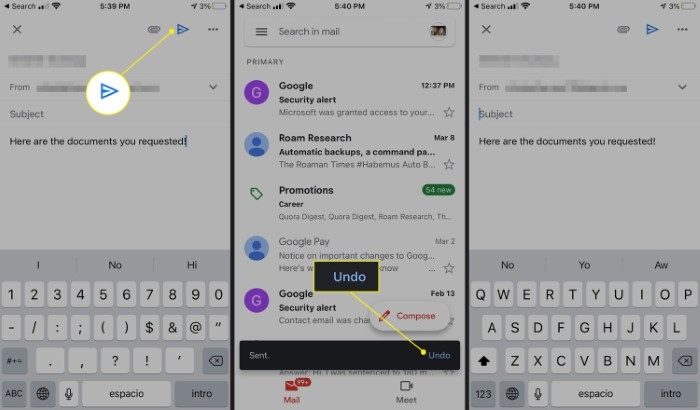
Gmail has this cool safety net. It’s called Undo Send. But here’s the trick: Gmail doesn’t really pull emails back. Nope. Instead, Gmail holds your email for a bit. Just wait. During that wait, you can stop it from leaving.
How Undo Send Works
After you hit send, Gmail shows “Undo” at the bottom.
Click it fast and:
- Email stops dead
- Message opens as draft
- You can fix it or trash it
Miss your chance? Gmail sends it anyway.
Gmail Undo Send Time Options
You get to pick:
- 5 seconds
- 10 seconds
- 20 seconds
- 30 seconds
To change this:
- Open Gmail Settings
- Click “See All Settings”
- Find Undo Send
- Pick your time
- Save it
Most folks pick 30 seconds. Better safe than sorry!
Can Outlook Recall Emails?
Outlook has this thing called Recall This Message. Sounds great, right? But hold up.
Outlook Recall Usually Works Only When:
- Both use Microsoft Exchange
- Both work at same company
- They haven’t opened it yet
Recall Often Fails When:
- They already read it
- Different email systems
- They use phone apps
- Message left your company
So yeah, Outlook recall helps sometimes. But don’t count on it.
How to Recall a Message in Outlook
- Open Sent Items
- Double-click the email
- Click File
- Pick “Resend or Recall”
- Choose “Recall This Message”
Outlook tries to grab it back. But like I said, no promises.
What If You Delete an Email Immediately?
People think being fast helps. Bad news. Email is faster. Even one second later? Too late usually. By then, it’s already in their inbox. Safe and sound.
The only times this might work:
- Undo Send timers
- Server is slow
- Internet hiccups
Otherwise? It’s gone, friend.
Can Recipients Still Read Deleted Emails?

Yep. For sure.
If they get it, they keep it.
That means they still have:
- Your message
- Those files
- Any photos
- All links
- Everything
Your delete button? Don’t touch their stuff.
What Happens to Attachments?
Files stay put too.
So if you sent by mistake:
- Private docs
- Personal pics
- Bank stuff
- Wrong files
…they can still open them. Unless you stop it before it sends.
That’s why file mistakes are scary.
Can You Delete Emails Before They’re Read?
Not really, no.Read or unread doesn’t matter. Once it lands, it’s theirs now. Unread emails just sit there waiting. But they’re still there.
What If You Sent an Email to the Wrong Person?
This happens all the time! Auto-complete gets us all.
If you mess up and send to wrong person:
Best Things to Do Right Now
- Try Undo Send super fast
- Use recall if you have Outlook
- Send a nice “oops” email
- Tell them what happened
- Ask nicely to delete it
Most people get it. We all make mistakes.
Don’t freak out. That makes it worse.
Can Deleted Emails Be Recovered?
Usually yeah.
Email apps keep deleted stuff in trash for a while.
Gmail
Keep trash for 30 days.
Outlook
Deleted Items hang around.
Yahoo Mail
Depends on your settings.
Apple Mail
Depends who you use.
So deleting doesn’t mean gone right away.
Are Permanently Deleted Emails Truly Gone?
Not always. Nope.
Emails might still live in:
- Server backups
- Cloud saves
- Security files
- Company systems
Companies especially save everything. Legal stuff, you know?
This shocks people.
Why Companies Save Email Records
Companies keep emails for:
- Legal stuff
- Following rules
- Security checks
- Looking back later
- Getting data back
So work emails? They stick around even after you delete them.
Common Email Mistakes People Regret
We all mess up emails.
The worst ones:
Replying to Wrong Person
Long email chains get confusing.
Hitting Reply All by Accident
Now everyone sees your message. Oops.
Sending Angry Emails
Mad emails are bad emails.
Forgetting Files
We’ve all done this one.
Typing Mistakes
Small typos can change everything.
Tips to Prevent Email Regret
Stopping mistakes beats fixing them.
Slow Down Before Sending
Just five seconds helps tons.
Check Who Gets It
Auto-complete tricks us all.
Turn On Undo Send
This saves people daily.
Check Your Files Twice
Make sure the right files are there.
Don’t Email When Mad
Write drafts first if upset.
Read Big Emails Again
Small mistakes cause big problems.
Are Emails Private?
Not really.
Emails can be:
- Sent to others
- Saved forever
- Screen-grabbed
- Watched by bosses
- Stolen by hackers
- Kept for years
So be careful with secrets.
Can Employers Read Deleted Work Emails?
Sometimes yeah.
Lots of companies save everything. IT folks can dig up old emails.
Big companies do this more.
Email Safety Tips Everyone Should Know
Good habits keep you safe.
Use Strong Passwords
Weak ones are asking for trouble.
Turn On Two-Factor
Extra safety never hurts.
Don’t Click Weird Links
Scam emails are everywhere.
Watch Those Files
Bad files have bad stuff.
Keep Codes Secret
Scammers want your codes badly.
FAQs
If I delete a sent email, can the recipient still see it?
Usually yes. You only delete your copy.
Can Gmail unsend emails?
Only for a few seconds with Undo Send.
Is Outlook recall reliable?
Not really. Works only sometimes.
Can someone tell if I recalled an email?
Sometimes. Outlook might tell them.
What happens if I delete an unread email?
They still keep their copy usually.
Can deleted emails be recovered?
Often yes. Check trash folders first.
How long do deleted emails stay in trash?
About 30 days. Depends on your app.
Can attachments still be opened after deletion?
Yes, if they already got the email.
Look, deleting sent emails doesn’t erase them from other people’s inboxes. Once they get it, they keep it. Your delete button can’t touch their copy. That’s why Undo Send and Recall exist. But they’re not perfect. The best fix? Don’t mess up in the first place. Take a breath before sending. Check who gets it. Look at your files. Read it one more time. Because once that email really leaves? Getting it back is way harder than you think.
