
Whether you’re a rider, driver, or UberEats customer, reaching Uber can sometimes be confusing. Many users search for a direct Uber email address when they run into issues, but is there really one standard address to contact Uber? What are the best ways to get help?
This complete guide explains everything you need to know about the Uber email address, how to contact Uber support effectively, and what alternatives are available when email isn’t enough. Whether you’re locked out of your account, dealing with a fare issue, or need help with a delivery, this guide will walk you through your options.
Is There a Direct Uber Email Address?

Uber does not offer a universal customer support email like [email protected] for general use anymore. Instead, they’ve shifted to in-app support and help portals to streamline issue resolution and improve response times.
However, some specific email addresses are still available for certain departments or regions.
Common Uber Email Addresses (May Vary by Use)
| Purpose | Email Address |
| Legal inquiries | [email protected] |
| Press or media | [email protected] |
| Law enforcement contact | [email protected] |
| Accessibility or discrimination | [email protected] |
| Driver-related support (some regions) | [email protected] (availability varies) |
These are not typically used for day-to-day customer issues like fare adjustments or app glitches. For most support needs, the app is still the primary method.
How to Contact Uber Support Without an Email Address
Since most general questions are not handled by email, Uber recommends using the following channels:
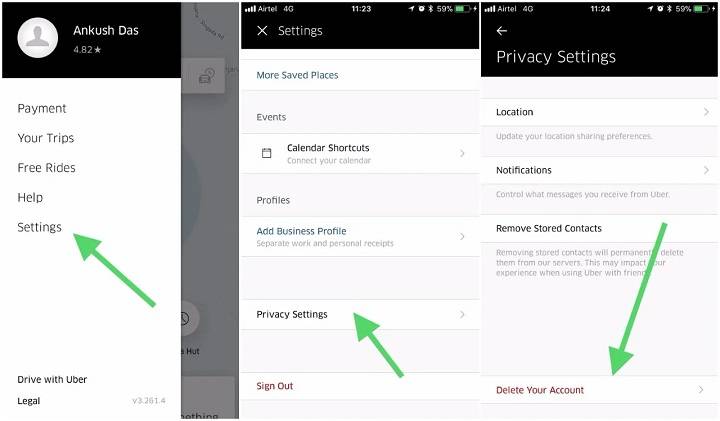
In-App Help (For Riders and Drivers)
- Open the Uber or Uber Driver app
- Tap Account or your profile icon
- Select Help
- Choose a topic (e.g., “Trip Issues,” “Payment,” “Account access”)
Each help topic leads to either a solution or a message form that gets sent directly to Uber’s support team.
Help.Uber.com Portal
Go to https://help.uber.com. This portal allows you to:
- Search for common issues
- Submit a request form
- Track your previous support requests
You must log in with your Uber account to submit help forms.
Uber Eats Support
Use the Uber Eats app or website and follow the same help menu to report issues related to orders, restaurants, or deliveries.
For Uber Eats drivers, use the Uber Driver app to access support.
Can You Reply to Uber’s Automated Emails?
Yes. If you’ve received an automated response or receipt from Uber (for example, trip receipts from [email protected]), you can reply directly to that email thread in some cases. Uber may respond if the reply matches a recent help ticket.
However, responses are not always guaranteed, and using the app is more reliable for active support cases.
Alternatives to Emailing Uber
If you can’t find a suitable email or need faster help, try these alternatives:
Live Chat Support (Limited Availability)
In select cities or regions, Uber offers real-time chat support via the app, especially for drivers. It may appear under your Help section for specific topics.
Twitter Support
Tweet to @Uber_Support on X (formerly Twitter). They respond quickly to public or direct messages, often directing you to the proper help link or resolving simple queries.
Visit a Greenlight Hub (Drivers)
Greenlight Hubs are physical locations where drivers can:
- Get onboarding support
- Resolve account issues
- Ask payment-related questions
To find a hub near you, search “Uber Greenlight Hub near me” or use the Driver app’s help section.
Uber Business Support
If you use Uber for Business, you can contact their business team through your dashboard or at [email protected].
When You Should Use Email (and When You Shouldn’t)
Use Email For:
- Legal or law enforcement matters
- Accessibility issues
- Media/press inquiries
- Follow-ups on formal complaints
Avoid Email For:
- Missing items
- Fare disputes
- Account login issues
- Order complaints
These are handled more efficiently through in-app support or the help portal.
Tips for Getting Better Support Without an Uber Email Address
- Be specific: Clearly describe the issue, include trip/order ID, time, and other relevant info.
- Use screenshots: Upload images when using support forms for better context.
- Stay logged in: You need to be signed into the correct Uber account when submitting forms.
- Be polite and patient: Most responses come within 24-48 hours, sometimes sooner.
Can Businesses Contact Uber by Email?
Yes, if you are a business partner or interested in Uber advertising, fleet partnership, or Uber Eats onboarding, email-based contact may still apply.
Some known addresses:
- UberEats restaurant onboarding: [email protected]
- Uber advertising or marketing inquiries: [email protected]
These emails are monitored and often used during partnership setup.
Frequently Asked Questions
What is Uber’s support email?
Uber no longer uses a general customer support email. Most help is provided through the app or help.uber.com. However, [email protected] or [email protected] may work for specific cases.
Can I email Uber Eats support?
It’s best to use the UberEats app’s Help section. Direct emails for Uber Eats are rare, but order-related help is handled quickly in-app.
What if I don’t get a reply from Uber support?
Try submitting the form again in the app or through the website. You can also reach out via Twitter (@Uber_Support) or visit a Greenlight Hub if you’re a driver.
Can I contact Uber about accessibility issues by email?
Yes, you can email [email protected] if you experience discrimination or accessibility-related concerns while using Uber.
Does Uber respond to email inquiries?
Only for specific departments. General customer issues are handled via in-app tools and forms, not through direct email responses.
