
Most folks know emails come without automatic replies. Yet few talk about how missing confirmations change actions. People adjust, wonder, even build habits around doubt. Receipts aren’t merely code. They connect to ideas about being seen, heard, expected. It’s not simply who clicked open a message that counts, rather the deeper need behind checking, plus the quiet routines that grow where answers should be.
Read Receipts in Email Systems
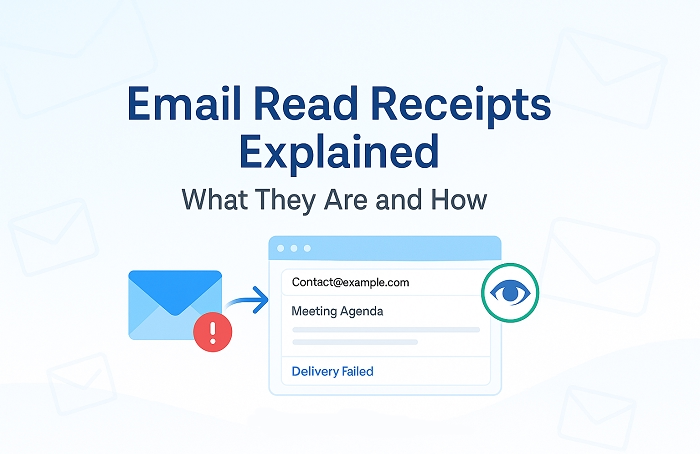
People often think turning on read receipts means they will know when someone sees their message. Yet, across most computers and phones, email systems stop those pings unless the receiver decides each time to allow it. Outlook gives senders the option to ask for proof of delivery or reading. Getting that confirmation depends on the recipient choosing to respond with approval. Most people simply ignore this. With iOS 18, Apple added read receipts inside Messages using iMessage among Apple gadgets. This does not apply to regular email built on older tech like SMTP or IMAP. As things stand in 2024, Gmail offers no such feature at all.
| Platform | Read Receipt Behavior |
| Outlook | Request can be sent, recipient must approve |
| Gmail | No built-in read receipt feature |
| Apple iMessage | Works only inside Apple Messages |
| Standard Email (SMTP/IMAP) | No automatic read confirmation |
Tracking Pixels Used by Email Tools
Tiny hidden pictures get sent along with messages by apps such as Mailtrack or Yesware. These come from outside servers, logging when someone opens an email. They do not always function properly. If images are blocked, the method fails completely. Services that prioritize privacy, like ProtonMail, remove these bits right away.
Why Pixel Tracking Can Be Misleading
Something else hides behind tracking pixels. Proof of load does not mean someone read it. When images appear, the signal is sent. That display can come from preview windows, bot checks, even background retrieval long before eyes land on screen. Google Workspace once pulled images through its own servers. A ping might record without any click or scroll. Even after Google shifted its approach in 2013 to guard user privacy, certain corporate filters keep setting off misleading signals. What looks like an opening could just be code reacting, not curiosity.
What Email Tracking Misses
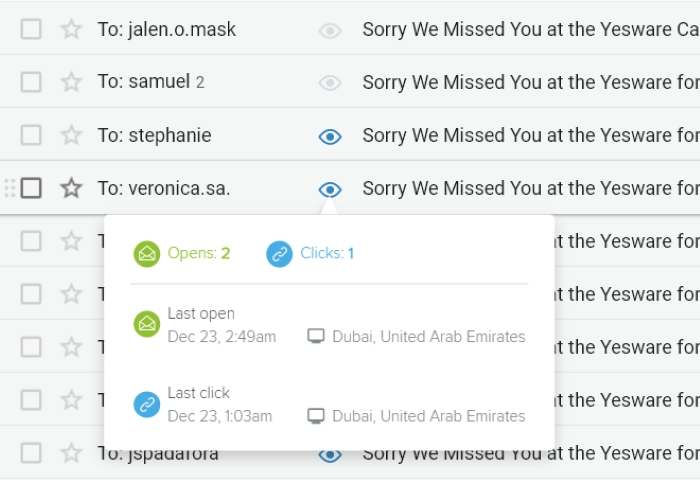
Imagine missing every second look someone takes. Most trackers catch just the opening moment. After that comes silence. There is no sign of returns or how long eyes linger. Scrolling depth disappears. A quick peek counts the same as deep attention.
| Tracking Signal | What It Shows | What It Misses |
| Pixel load | First open event | Reading time |
| Preview loading | Possible view | Real attention |
| Security scan | Image load | Human interaction |
Signals That Sometimes Suggest Attention
Now and then hints appear without being obvious. A slow answer might mean a message never arrived. It might also mean someone chose to wait. Quick replies often point to instant availability. Sorting setups, bots, or auto-filing can twist that idea.
Downstream actions may hint at interest:
- calendar invites
- follow-up questions
- file changes
These remain signs, not proof.
Tracking Inside Company Systems
Messages inside big companies might show extra details. Some firms run private analysis tools tied to work apps. When two people email within one system, tracking may exist behind the scenes. For example, companies using Microsoft 365 with logging may track messages under certain rules. Regular staff cannot view those records. Personal boundaries remain protected by design. Watching coworkers without permission breaks protocol where oversight matters.
Interpreting Silence
Morning arrivals of nighttime emails might mean little if someone often reads mail after hours. Patterns matter more than single moments. Silence also changes meaning across cultures. One place sees patience. Another reads it as refusal. A gap between sending and replying may hide many meanings.
The Mental Weight of Waiting
A weight sits quietly in the mind. Each glance at the inbox pulls attention away from other work. Alerts train people to search for endings that may not come. The unknown feels harder to accept, even though uncertainty has always existed in human communication.
Changing Expectations
Maybe try something different. Instead of chasing responses, reset expectations.
For urgent communication people often use tools that show activity directly:
- shared documents
- task boards
- secure messaging platforms
Email works best when messages remain clear. Short subject lines help. Requests written in small pieces help. Deadlines written directly help.
Simple Acknowledgment
Sometimes the easiest solution is simply saying a message arrived. A short reply confirming receipt moves things forward. Few people do this, even though it keeps space clear and trust closer.
Read Receipts and Trust

Many overlook how constant check-ins weaken confidence. Asking for receipts can make messages feel like audits. It suggests someone might be careless unless proven otherwise. Real working relationships grow through mutual respect, not oversight.
What Open Tracking Cannot Show
Digital signals rarely capture the full picture. Open counts and timestamps feel precise, yet they miss the real question. Did someone understand the message? Did they act on it? Tracking clicks cannot answer that.
FAQs
Do email read receipts always work ?
No. Most email programs require the recipient to approve them.
Can tracking pixels confirm someone read an email ?
No. They only show that an image is loaded.
Does Gmail support read receipts ?
Not for most users.
Why do people still check open rates ?
Because they look like proof of engagement.
What matters more than email opens ?
Understanding and action.
Stuck on hold of a reply, the mind spins. Those blue marks, meant to show clarity, sit there – quiet, like empty promises inside an inbox. Thinking often needs space. Slower answers can show up later – yet carry more sense. Honest speech, waiting, trust: these build connection better than any monitor could manage.
