

Trying to email a big video can get frustrating real fast. You attach the file. Wait forever for it to upload. Then suddenly your email app hits you with: “File too large.” Yeah. Super annoying honestly. Especially now when videos are huge by default.
Phones record in:
- HD
- 4K
- High frame rates
- Massive file sizes
Even a short video can end up:
- 500 MB
- 1 GB
- Bigger sometimes
Way too large for regular email attachments.
That’s why so many people get stuck trying to send:
- Family videos
- Work presentations
- School projects
- Wedding clips
- Screen recordings
- Marketing videos
The good news? There are actually several easy ways to send large videos without ruining quality. Let’s walk through exactly how to email large videos properly and avoid those annoying upload errors.
Why Large Videos Won’t Attach to Emails
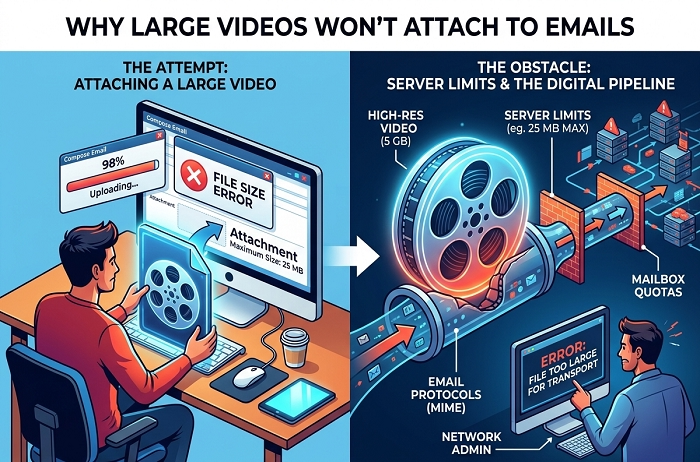
Most email services limit attachment size.
This helps prevent:
- Spam
- Slow servers
- Huge uploads
- Security issues
So once your video gets too big?
Email apps block it automatically.
Gmail Video Attachment Limits
Gmail usually allows:
25 MB max attachment size.
That’s honestly tiny for modern videos. Most phone videos exceed that easily.
Outlook Attachment Limits
Microsoft Outlook usually allows:
around 20 MB to 25 MB.
Depends on account type honestly.
Why Modern Videos Are So Huge
Because phones now record in:
- 1080p
- 4K
- HDR
- High-quality formats
Better quality means:
bigger file sizes.
Simple tradeoff honestly.
Best Ways to Email Large Videos
Usually these work best:
- Cloud storage links
- Video compression
- ZIP files
- File transfer services
Way easier than fighting attachment limits honestly.
Easiest Method: Google Drive
Honestly?
Probably the easiest option for most people.
How Google Drive Video Sharing Works
Instead of attaching video directly:
- Upload video to Google Drive
- Share link through email
Done.
No attachment size problem anymore.
Steps to Send Large Video Through Gmail
Usually:
- Open Gmail
- Compose email
- Click Google Drive icon
- Upload video
- Insert sharing link
- Send email
Very smooth honestly.
Why Google Drive Works So Well
Because:
- Huge storage support
- Easy sharing
- Fast downloads
- No major email size issues
Great for large videos honestly.
How Outlook Handles Large Videos
Outlook often uses:
OneDrive integration.
Similar process honestly.
Steps
- Attach large video
- Outlook uploads it to OneDrive automatically
- Email sends download link instead
Very convenient honestly.
What Is Cloud Storage?
Cloud storage means:
files stored online instead of directly inside emails.
Popular options:
- Google Drive
- OneDrive
- Dropbox
- iCloud Drive
Very common now.
Why Cloud Links Are Better Than Attachments
Honestly?
Lots of advantages.
Faster Sending
No giant attachment uploads inside email.
Easier Downloads
Recipients download directly.
Better Quality
Videos stay full quality.
Fewer Email Errors
Huge win honestly.
Can You Compress Videos Before Emailing?
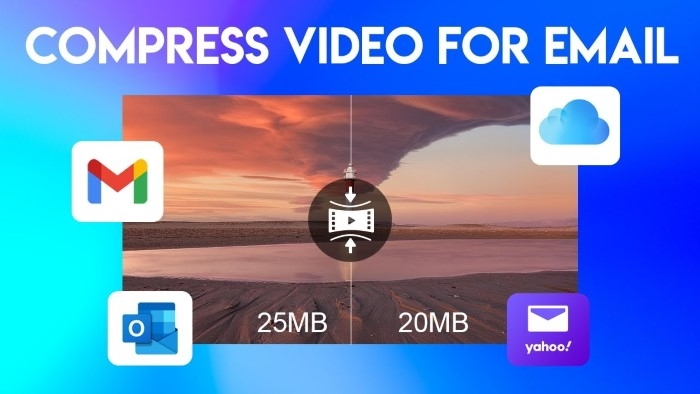
Absolutely.
Compression makes files smaller.
Very useful honestly.
What Is Video Compression?
Compression reduces:
- File size
- Storage space
while trying to keep video quality decent.
How to Compress Videos on Windows
Usually:
- Use apps like HandBrake
- Compress into ZIP
- Lower resolution
HandBrake is very popular, honestly.
How to Compress Videos on iPhone
iPhones allow:
- Lower recording quality
- Compression apps
- Sharing through cloud services
Very useful for huge videos.
How to Compress Videos on Android
Android offers:
- Compression apps
- Video resizing tools
- Sharing through Drive or Dropbox
Pretty easy honestly.
Does Compressing Reduce Quality?
Sometimes yes. Depends how heavily compressed. Small compression? Usually looks fine. Extreme compression? Video quality drops noticeably.
What Video Format Is Best for Email?
Usually:
MP4.
Why?
Because:
- Smaller file sizes
- Better compatibility
- Good quality balance
Most devices support MP4 easily.
Can ZIP Files Help With Large Videos?
Sometimes a little. ZIP compression may slightly reduce size. But honestly? Videos are already compressed heavily usually.
ZIP helps more for:
- Multiple files
- Folder organization
not massive size reduction.
Best File Transfer Services for Huge Videos
Sometimes cloud storage works best. Other times file transfer services help more.
Popular options include:
- WeTransfer
- Dropbox Transfer
- Smash
- Send Anywhere
Very useful honestly.
How WeTransfer Works
Usually:
- Upload video
- Generate download link
- Email link to recipient
Simple honestly.
Why People Love WeTransfer
Because:
- No complicated setup
- Large file support
- Fast sharing
- Easy downloads
Great for creative work honestly.
Can You Send Videos Through iCloud?
Yep.
Apple users often use:
iCloud links.
Especially for:
- iPhone videos
- Family sharing
- Large clips
Very common honestly.
What Happens If the Recipient Can’t Open Video?
Usually caused by:
- Unsupported file format
- Corrupted upload
- Download issues
MP4 usually avoids most compatibility problems.
Can You Password-Protect Video Links?
Some services allow:
- Passwords
- Expiration dates
- Download limits
Very useful for private videos honestly.
Why Videos Sometimes Upload Slowly
Usually because of:
- Slow internet
- Huge file size
- Weak Wi-Fi
- Cloud syncing delays
Large 4K videos take time honestly.
Can You Send Large Videos From Your Phone?
Absolutely.
Modern phones make this pretty easy now.
Usually easiest methods:
- Google Drive
- iCloud
- Dropbox
- WeTransfer apps
Way better than direct attachments honestly.
Can Large Video Emails Go to Spam?
Sometimes yes.
Especially if:
- Huge attachments exist
- Suspicious links appear
- Unknown file types used
Cloud links reduce spam risks honestly.
Common Large Video Email Mistakes
People hit these constantly.
Trying to Attach Gigantic Files Directly
Most common honestly.
Using Wrong Video Format
Rare formats cause problems.
Forgetting Sharing Permissions
The recipient can’t access the file.
Uploading Over Weak Internet
Uploads fail halfway.
Sending Wrong Video
Classic mistake honestly.
Want smoother video sharing?
Do this stuff.
Use Cloud Links
Usually easiest, honestly.
Compress Videos Slightly
Helps uploads.
Use MP4 Format
Most compatible option.
Double-Check Sharing Permissions
Very important.
Rename Video Clearly
Helps recipients.
Test Download Link First
Avoid embarrassing errors honestly.
How Long Do Video Links Stay Active?
Depends on service.
Some expire:
- After days
- After downloads
- After inactivity
Others stay permanently unless deleted.
Can You Edit Shared Videos After Sending a Link?
Sometimes yes.
Cloud storage allows:
- Replacing files
- Updating permissions
- Removing access
Very useful honestly.
Are Large Video Links Safe?
Usually yes if using trusted services.
Still:
- Avoid suspicious file links
- Use secure passwords
- Share privately when needed
Good security matters honestly.
Can Businesses Email Large Videos?
Absolutely.
Very common for:
- Marketing
- Presentations
- Training videos
- Creative projects
Most businesses rely on cloud sharing now honestly.
FAQs About Emailing Large Videos
Why won’t my video attach to email?
Usually file size is too large.
What is Gmail’s attachment limit?
Usually around 25 MB.
What’s the best way to send huge videos?
Cloud storage links honestly.
Does compression reduce video quality?
Sometimes slightly.
What format works best for emailing videos?
MP4 usually.
Can Outlook send large videos?
Yep using OneDrive links.
Are ZIP files good for videos?
Only slightly helpful honestly.
Can phones send large videos?
Absolutely through cloud services.
Trying to email large videos directly usually becomes frustrating fast. Modern video files are simply too huge for normal email attachments most of the time. But honestly? Cloud storage and file sharing tools make the whole process way easier now.
Instead of fighting upload limits, you can:
- Share links
- Keep full quality
- Avoid failed attachments
- Send huge files easily
And once you start using cloud sharing regularly? You’ll probably never want to attach giant video files directly again.
