
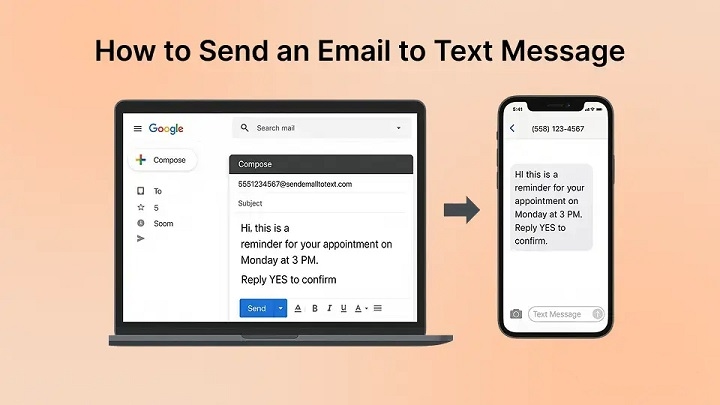
Email turned into a text is not about linking apps together. It reroutes a message through networks originally built for personal phone conversations. Many assume special apps are required, yet phone carriers quietly maintain older gateways that handle the conversion. These pathways date back to earlier technology. They remain active even today, though few people notice them because carriers rarely advertise the feature.
How Email-to-Text Gateways Work
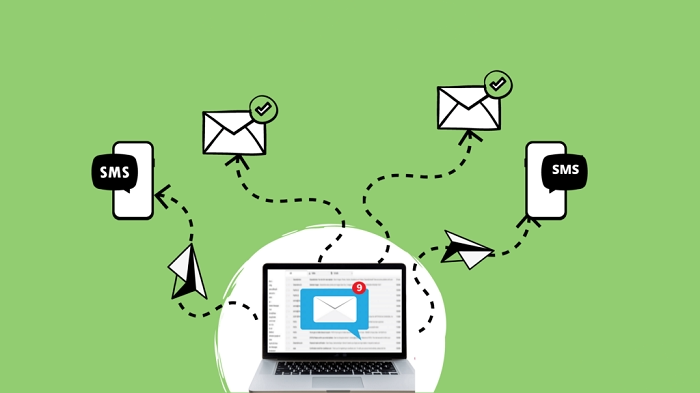
Phone providers created these gateways when older mobile phones struggled with internet data. Email messages needed a way to reach devices that could only handle SMS. When someone sends an email to the special address tied to a phone number, the carrier converts it into a text message. During the process, parts of the original email change.
- Headers are removed
- Formatting disappears
- Long messages may be shortened
What arrives on the phone is simply the core text of the message.
Carrier Gateway Addresses
Each carrier uses its own email format for this process. A phone number becomes the start of the email address, followed by the carrier’s gateway domain.
| Carrier | Gateway Address Format |
| Verizon | [email protected] |
| AT&T | [email protected] |
| T-Mobile | [email protected] |
For example, sending an email to [email protected] delivers a text message to a Verizon phone. These addresses have remained largely unchanged for more than fifteen years.
Correct Phone Number Formatting
Formatting matters when creating the gateway address. The phone number must contain exactly ten digits.
| Format | Result |
| 1234567890 | Works |
| (123)456-7890 | Fails |
| 123-456-7890 | Fails |
| +11234567890 | Often fails |
Even small formatting differences prevent delivery.
Message Length and Formatting Limits
Email messages converted to SMS follow older texting standards. Many networks limit the text length to about 160 characters.
Other elements may also disappear during conversion:
- Subject lines may be removed
- Line breaks may vanish
- Styling and formatting disappear
- Attachments do not transfer
Only the basic message text usually reaches the phone.
Reply Behavior
When the recipient replies, the response normally returns to the sender’s email address rather than to a phone number. However, two-way communication does not always work. Some networks only allow one-direction delivery from email to text. Without additional tools to track incoming responses, the system may behave as a one-way channel.
Carrier Filtering and Message Blocking
Not every message sent through these gateways arrives successfully. Carriers often filter messages to prevent spam.
Certain patterns can trigger filters:
- Suspicious links
- Excessive punctuation
- Repeated promotional phrases
Messages containing urgent marketing language such as “Act now” may also be blocked.
Keeping the message simple often improves delivery chances.
Delivery Timing
Some messages arrive in seconds, while others take several minutes. Network congestion can slow the process. Business messaging systems sometimes move faster because they use dedicated channels. Standard email-to-text gateways do not receive priority treatment. Unlike many messaging platforms, these gateways also do not provide read confirmations.
Privacy Considerations
Privacy can become confusing in this system. A text message reply may reveal the sender’s email address even though the original message appeared to come from a phone number. Carrier systems may also retain certain metadata from the email message behind the scenes. This can surprise users who expect the exchange to behave exactly like ordinary SMS.
Changes in Carrier Policies
Carrier policies change over time. Features that work today may disappear later. Network mergers, security concerns, or new messaging technologies sometimes lead providers to disable gateway access. Smaller carriers or prepaid services may block email-to-text conversion entirely. Because of this, reliability varies depending on the carrier involved.
Alternative Messaging Tools
Other tools can connect messaging systems, though they require more setup.
Examples include:
- iMessage
- Automation tools such as IFTTT or Zapier
These tools rely on installed apps, device permissions, or background services.
The gateway method avoids those requirements because it uses infrastructure already built into carrier networks.
Why Text Messages Get Noticed Faster
Messages delivered through SMS often receive attention faster than email. Text alerts appear immediately on phones and are usually checked quickly. A 2019 analysis by OpenMarket found that more than 90 percent of text messages are opened within minutes, and nearly all are read within a day. Email behaves differently. Many messages remain unopened in crowded inboxes. Changing the delivery channel can influence whether a message is noticed.
An Older System Still Running
Email-to-text gateways rely on older communication technologies connecting internet email systems with mobile signaling networks. These systems remain active largely because shutting them down could disrupt certain fallback communications and emergency messaging functions. The technology is not flashy, but it continues operating quietly behind modern communication tools.
FAQs
Can you send an email as a text message?
Yes. Using a carrier gateway address allows an email to be delivered as an SMS message.
Why didn’t my email-to-text message arrive?
Formatting errors, spam filters, or unsupported carriers may prevent delivery.
Do attachments work in email-to-text messages?
No. Attachments are removed during the conversion process.
Will the recipient see my email address?
Sometimes. Replies may reveal the original sender’s email address.
Are these gateways guaranteed to keep working?
No. Carrier policies may change or block the feature.
Email-to-text gateways provide a quiet bridge between two different communication systems. By converting an email into a short message, carriers allow information to move from internet networks into mobile messaging channels. The process relies on older infrastructure that still operates behind modern interfaces. While not perfect, it remains a useful way to deliver messages across platforms without installing new software or applications.
