
Your inbox fills up way faster than you’d think. Between work stuff, alerts, newsletters, receipts, and chats with friends, it gets crazy pretty quick. When that happens, you might spot the Archive button but pause. What does it even do?
Some folks worry it’ll delete their email. Others think it hides messages forever or makes them super hard to find. These mix-ups often mean people skip archiving completely – even though it’s one of the best ways to keep your email tidy.
This guide breaks down what archiving really does. We’ll cover how it works on different email apps and when you should use it in 2026.
What Archiving an Email Actually Means
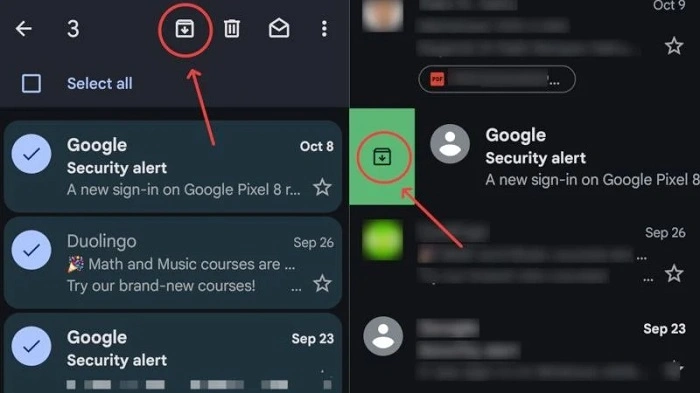
Floating away from view – archived emails still live inside your account. Not gone, never tossed aside. A quiet corner holds them, ready when needed. Pull one back with a quick search, or wander into the archive itself to pick it up again.
Picture your inbox as a workspace. Not every item stays front and center. Some shift quietly into storage – out of sight, yet still reachable. Files move aside when they’re no longer urgent. That shelf where they rest? It’s not hidden, just tidy. Clutter fades without losing value. Space opens up naturally. What matters remains close, just not in the way. Order comes from movement, not deletion.
What Happens Behind the Scenes When You Archive an Email
When you hit the archive, your email service just changes where it shows that message. It doesn’t delete anything. The email leaves your inbox view but stays on the server, still linked to your account.
Nothing gets changed. No files go missing. No data vanishes. The message just moves out of sight so you can focus on the emails that need your attention right now.
Archiving vs Deleting an Email
People mix these up because both remove emails from your inbox. But here’s the big difference – what happens after.
Delete is for stuff you don’t want anymore. Archive is for stuff you want to keep but don’t need to see every day.
What Happens When You Archive an Email
Archiving is super safe and easy to undo. It clears the clutter but keeps everything handy.
When you archive:
- The message leaves your inbox
- It stays in your account
- You can still search for it
- If someone replies, it pops back up
This makes it perfect for conversations or info you might need later.
What Happens When You Delete an Email
Deleting is more final, even though emails go to trash first. After a while, they’re gone for good.
When you delete:
- It goes to your trash folder
- It gets wiped after some days
- You might not get it back
Save deleting for emails you’re totally sure you won’t need.
Where Archived Emails Are Stored
Archived emails don’t vanish. They just live somewhere else, and each email app handles this a bit differently. But the basic idea? Same everywhere.
Knowing where they go makes finding them way easier.
Archived Emails in Gmail
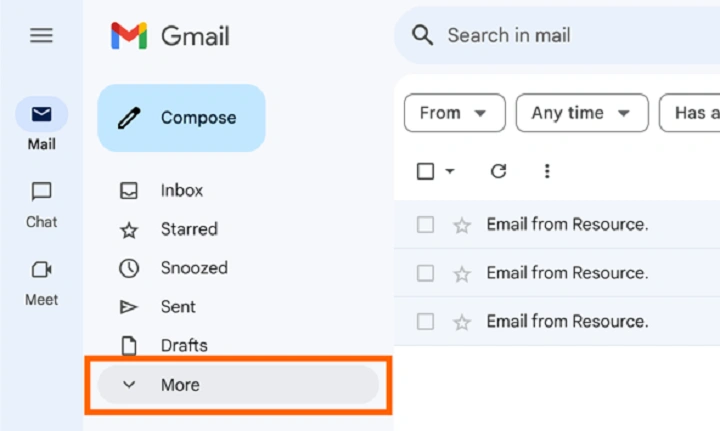
Gmail does weird things. When you archive, it just takes off the “Inbox” tag. Your email moves to “All Mail” – which holds every message you haven’t deleted.
New Gmail users find this confusing. There’s no folder called “Archive” to see. But don’t worry – your email’s still there.
Archived Emails in Outlook
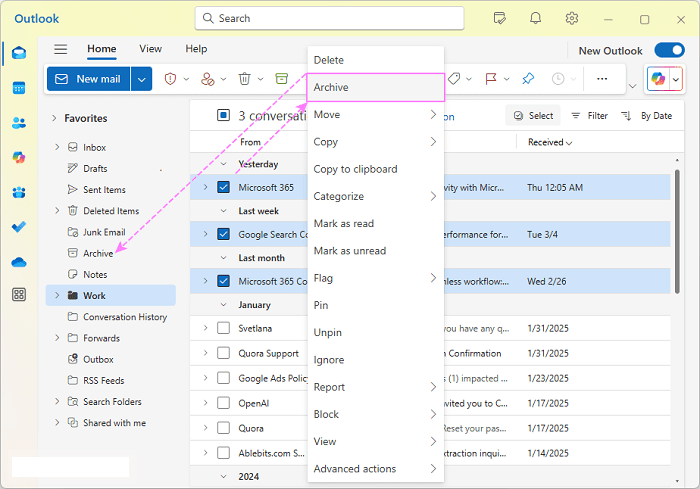
Outlook usually puts archived emails in an Archive folder. Sometimes they just leave the inbox view, depending on your setup.
Either way, your messages stay safe and searchable.
Archived Emails in Other Email Apps
Most email apps (like Apple Mail or Android’s email) work the same way. Messages leave the inbox but stay stored and sync across all your devices.
Can You Still Find Archived Emails?
Yep! Finding archived emails is just as easy as finding inbox ones. Search works on everything.
Remember who sent it? Part of the subject? A word from the email? Just search for it. You’ll find it quick. That’s why archiving rocks.
Do Archived Emails Come Back to the Inbox?
In lots of email apps, archived emails bounce back if someone replies. This is great for chats that are done for now but might start up again.
Don’t want emails coming back? You might need to mute them or set up filters instead.
Why Many People Prefer Archiving Over Folders
Folders used to be the go-to for email organizing. But in 2026? Most people archive and search instead.
Why sort every email into folders when you can just archive and search later? It’s less work and way faster.
People love archiving because it:
- Cuts down on sorting time
- Keeps the inbox clean
- Makes finding stuff quick
- Skips the folder mess
- Works great with ongoing chats
For most folks, it’s just easier.
When You Should Archive an Email
Archive emails that aren’t urgent but might be useful later. These are messages you’re done with but want to keep around.
Think finished chats, order confirmations, how-to guides, and records.
Emails That Are Good Candidates for Archiving
Wondering if you should archive? Ask yourself: “Am I done with this but might need it later?”
Common emails to archive:
- Work chats that are wrapped up
- Receipts and payment proof
- Trip details
- How-to instructions
- Old project updates
If you don’t need to do anything with it, archive away.
When You Should Not Archive an Email
Some emails need to stay visible until you handle them. Archive too soon? You might miss deadlines or forget tasks.
Before you archive, double-check – does this need action from me?
Emails That Should Stay in the Inbox
Your inbox should be your to-do list.
Keep these visible:
- Emails you need to reply to
- Tasks you haven’t done
- Urgent stuff
- Time-based reminders
Using your inbox as an action list keeps things clear.
Does Archiving Save Storage Space?
Nope. Archived emails use the same space as inbox emails.
Running out of room? You’ll need to delete big emails or old ones you don’t need. Archiving is about tidying up, not saving space.
Is Archiving Safe for Important Emails?
Totally safe! Archiving doesn’t delete or change anything. Your emails won’t disappear unless you choose to delete them.
Got super important stuff? Maybe back it up somewhere else too, just to be extra safe.
How Archiving Works Across Devices
Archive on your phone? It archives on your computer too. Modern email keeps everything synced up.
This makes archiving great for people who switch between devices all day.
Archiving as Part of a Clean Inbox System
Lots of productivity methods love archiving. The idea? Handle each email once, then get it out of your inbox.
Your inbox shows what needs doing. Your archive holds everything else.
Here’s a simple flow:
- Read the email
- Need to do something? Do it or schedule it
- Done with it? Archive
- Repeat
This keeps things neat and stress-free.
Can Archived Emails Be Restored to the Inbox?
Sure can! You can always move archived emails back. Just find the message and hit “Move to Inbox” or add the inbox label back.
This makes archiving super low-risk.
Common Myths About Archiving Emails
People skip archiving because of wrong ideas. Let’s clear these up.
Myths people believe:
- Archived emails get deleted (nope!)
- They vanish forever (they don’t!)
- You can’t search for them (you can!)
- It’s not safe (totally safe!)
None of these are true with today’s email.
Best Practices for Using Archive Effectively
Archiving works best when you do it the same way each time. Build simple habits for a way better inbox.
Good habits:
- Archive when tasks are done
- Keep action items in inbox
- Use search, not folders
- Check archives when needed
- Don’t overthink it
Being consistent beats being perfect.
Is Archiving Still Useful in 2026?
Archiving remains highly relevant in 2026. Even with smart filters and AI sorting, the archive function is central to email organization.
Modern email systems are designed around fast search and clean inboxes, and archiving supports both goals.
Quick Summary
Out of sight, the email slips into storage instead of vanishing forever. Inside that quiet space, it stays ready – findable whenever needed.
Later on, stored messages wait quietly – safe but out of view. Over time, less clutter makes each morning clearer.
FAQs
Does archiving an email delete it?
No. Archiving keeps the email stored in your account and fully accessible.
Where do archived emails go?
They are stored in an archive or all-mail area and remain searchable.
Can archived emails return to the inbox?
Yes. Replies often bring the conversation back to the inbox automatically.
Is archiving better than using folders?
For many users, search-based retrieval combined with archiving is faster and simpler.
Does archiving free up storage space?
No. Archived emails still count toward storage limits.
