
In the era of smartphones, our mobile devices define everyday existence. They contain sensitive data, such as internet history, app usage, and personal information. But along with this digital convenience comes privacy concerns. Who can see my mobile data history? As we navigate the digital terrain, knowing who can access our personal information and what steps we can take to safeguard it becomes vital.
This article will explore the various entities and people who might have access to your mobile data history, the potential risks involved, and how you can protect your privacy.
What Is Mobile Data History?
Before considering who can view your mobile data history, it’s important to understand what it entails. Mobile data history refers to the records of your internet, app, and website activity while using mobile data or Wi-Fi on your smartphone.
This data includes:
- Browsing history: Websites you visit, search terms used, and pages viewed.
- App usage: Which apps you have installed, how often you use them, and how long you remain active on them.
- Location data: GPS-tracked details about your location.
- Call and message logs: Records of your contacts and sometimes the content of your communications.
Being aware of who has access to this information is crucial since this history might be stored on your phone, by your mobile carrier, or even by third-party apps.
Who May View My Mobile Data History?
Your mobile data history may be accessible to various entities. While some have legitimate reasons, others may raise privacy concerns. Here are the key players:
Your Mobile Carrier
The first entity that can access your mobile data history is your mobile carrier. Mobile providers track and store data on your use of mobile data, including call logs, browsing histories, and text message records. They may view your information for various reasons, including:
- Billing: To determine charges for data usage.
- Network optimization: To ensure the best service.
- Legal requirements: Sometimes they may be required to provide information to law enforcement.
However, mobile carriers are limited by laws on how long they can retain this data and under what conditions they may share it with third parties.
Your Internet Service Provider (ISP)
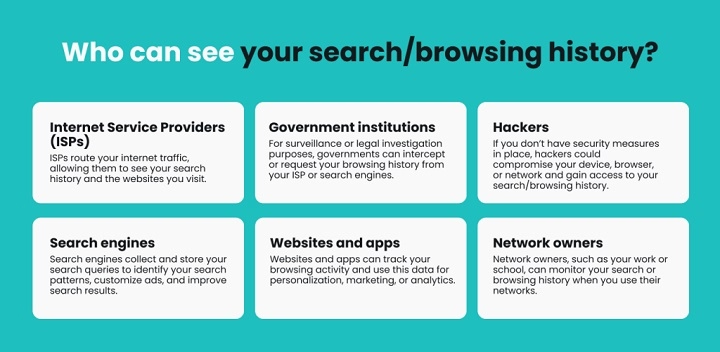
Your Internet Service Provider (ISP) can also access your browsing data when you’re using Wi-Fi on your mobile device. Since they provide the internet connection to your home or office, ISPs can monitor your online activity. The extent of their access to your data may depend on:
- The type of connection: Whether you’re using public or private networks.
- Legal obligations: In some cases, ISPs may be required to hand over user information to authorities.
ISPs are typically bound by privacy laws, just like mobile carriers, but your data can still be tracked to some extent.
Third-Party Apps and Services
Many of the apps you use on your phone collect data about your usage. These apps may track:
- Your activities: Interactions, purchases, and more.
- Your location: If location services are enabled, apps can track where you are.
- Your personal information: Many apps request access to your contacts, photos, and other personal data.
This information is usually used for advertising purposes or to enhance the user experience. However, it can also be shared with third parties, raising significant privacy concerns.
Government and Law Enforcement Agencies
In criminal investigations, law enforcement agencies may legally access your mobile data history. This could involve:
- Access to call records: To track communication between individuals.
- Search warrants: Law enforcement can seize your phone or request data from your mobile carrier or ISP.
While privacy laws protect your data, law enforcement has the power to request access under specific circumstances.
Cybercriminals and Hackers
The risk of hacking is one of the major concerns for mobile phone users. Cybercriminals can gain access to your phone’s data through:
- Malware: Programs designed to infiltrate your phone and collect personal information.
- Phishing attacks: Fraudulent attempts to acquire personal information by pretending to be a trusted entity.
If your phone is hacked, criminals can gain access to everything, including contacts, sensitive data, and browsing history.
Family and Friends (If Your Phone Is Shared)
If someone else has access to your mobile device, they could easily check your data history. This is especially true if you share your phone with a spouse, friend, or family member. To prevent this:
- Use a secure lock screen: Make sure your phone is protected with a strong password or biometric authentication.
- Clear your history: Regularly delete your browsing and app usage history to maintain privacy.
Limited Access by Mobile Device Manufacturers
Some mobile device manufacturers, like Apple and Google, collect certain data for diagnostic and performance-related purposes. While this data is typically anonymized, these companies claim to respect your privacy. They may not directly access your browsing activity, but they do collect:
- Device usage: How you interact with your device and apps.
- Diagnostics: Information about the functioning of the device.
Typically, this data is aggregated and not personally identifiable.
How to Protect Your Mobile Data History

Now that you know who can view your mobile data history, it’s important to take steps to protect your privacy. Here are some practical ways to safeguard your data:
Use Strong Passwords and Biometrics
Ensure your phone is protected by a strong password, fingerprint scan, or facial recognition. This will prevent unauthorized access to your device.
Enable Two-Factor Authentication (2FA)
For added security, enable 2FA on your accounts. This provides an extra layer of protection when logging into apps or websites.
Use Private Browsing
Most mobile browsers offer a “private browsing” or “incognito mode” feature. When enabled, this mode ensures that your browsing history is not saved on your device.
Clear Your History Regularly
Make it a habit to clear your browser history, app data, and cache. This reduces the chances of someone else accessing your past activities.
Monitor App Permissions
Review the permissions that apps request and only grant access to data that is necessary. For example, if a weather app asks for access to your contacts or camera, reconsider whether this is required.
FAQs
Does my mobile carrier have access to my browsing history?
Yes, your mobile carrier can access your call records, browsing history, and other usage data. However, they must comply with privacy laws.
Can I stop my ISP from tracking my data?
While it’s difficult to completely prevent your ISP from monitoring your data, using a VPN can help mask your online activities.
Do third-party apps track my mobile data history?
Yes, many apps track your usage and share your data with advertisers. Review app permissions to reduce this tracking.
How can I protect my data from hackers?
Install antivirus software, avoid downloading suspicious apps, and be cautious when using public Wi-Fi networks to reduce the risk of hacking.
Can law enforcement access my mobile data history?
Yes, law enforcement can access your mobile data history with a warrant or in the case of an investigation.
