
Hey there! Let’s talk about finding emails. You know how it is. Sometimes you need to reach someone. Maybe it’s for a job. Or to pitch an idea. Could be to connect with a business owner. Or just to say hi to an old friend. Email is still the best way to do this stuff, right?
But here’s the thing – finding emails can feel tough. People are super careful about privacy now. Many folks don’t put their info out there anymore. Which means you gotta know where to look. And how to do it the right way.
I’ll show you how to find emails in 2026. We’ll use real methods that work. Plus, I’ll tell you what NOT to do. And how to make sure the email is real. Then how to actually reach out once you find it.
Before We Start: Let’s Be Real
First things first. Not every email is meant to be found. Some people want to stay private. That’s cool. We should respect that.
You need a good reason to find someone’s email. Cold emails work best when they make sense. When they’re nice. And when you’re honest about why you’re reaching out.
If you’re not sure why you need their email? Maybe don’t look for it. Just saying.
Start With the Easy Stuff First
Lots of people go crazy searching everywhere. But wait! Check the simple places first. The email might be right there already.
Check Their Website
Got a person who runs a business? Has a blog? Does freelance work? Their email is probably on their site.
Look at these spots:
- the contact page (duh!)
- the about page
- way down at the bottom
- press or media pages
Some sites use forms instead. But many still show emails openly.
Look at Social Media
This is where people share contact info all the time. Especially for work stuff.
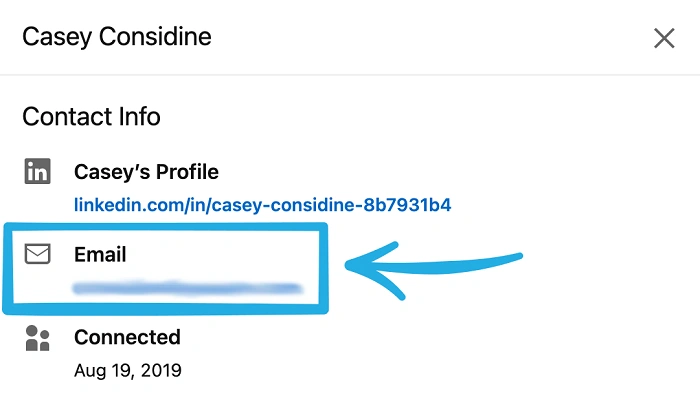
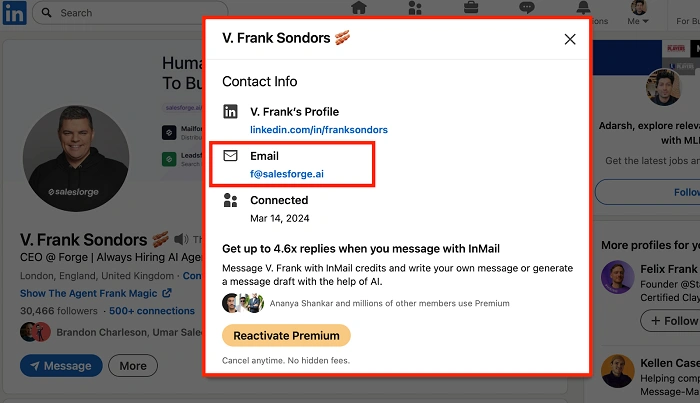
LinkedIn rocks for finding work emails. Tons of users put their email in the contact info part.
Don’t just scroll around. Really check out their profile. Some hide emails until you connect. Others show it to everyone.
Twitter (X), Instagram, and Facebook
Other sites might have emails too. Look in bios. Check profile info. This works great for creators and business folks.
Check these spots:
- bio sections
- profile descriptions
- pinned posts
- business contact buttons
People forget about these. But they work!
Check Company Sites and Staff Lists
Does the person work somewhere? Their email might be on the company site.
Schools, hospitals, nonprofits, government places – they often have staff lists. With emails! They do this to be open and easy to reach.
Always check if there’s a list before trying harder methods.
Use Email Patterns (They’re Pretty Simple)
No public email? No problem. Most companies use patterns. Same format for everyone.
Common ones:
Know the company? You can guess pretty well.
This works best for big companies. They love standard formats.
Also Read: What Does It Mean When an Email Is Queued?
Use Email Finder Tools (But Be Cool About It)
Email tools got way better in 2026. They search public info. Check if emails work. Tell you how sure they are.
But listen – use these for work stuff. Not to be creepy.
What These Tools Do
They basically:
- scan public web stuff
- look at email patterns
- check if emails work
- flag bad or fake ones
They don’t hack into private stuff. That’s not how it works.
When to Use Email Tools
Good times to use them:
- reaching out to pros
- sales or hiring stuff
- networking (the right way)
- contacting business folks
Don’t use them to bug people. Or stalk. Just don’t.
Search Engines Still Work Great
People forget about Google. But a simple search can find a lot. You just gotta know how.
Try stuff like:
- “John Smith email”
- “John Smith contact”
- “John Smith @company.com”
Use quotes to narrow it down. Emails pop up in PDFs. Or old conference stuff. Or random pages.
Check Papers and Articles
People who speak at events? Write research? Do interviews? They often share contact info.
Look for:
- research papers
- speaker bios
- press releases
- interviews
- PDF resumes
These are legit sources. And people miss them!
Use Alumni Groups and Work Communities
Went to the same school? In the same industry? These groups sometimes share contact info with members.
Just follow the rules. Respect privacy policies. Be nice about it.
Just Ask! (When It Makes Sense)
Sometimes the best way is the simple way. Can you message them somehow? Just ask for their email!
This works great on LinkedIn. Or work forums.
Send a short, nice message. Tell them why you want to email. Most people say yes!
What NOT to Do
Some ways to find emails are bad news. They can hurt your rep. Or even break laws.
Don’t do this stuff:
- scrape private data
- buy email lists (gross)
- use hacked or leaked info
- guess a million times and spam
- pretend to be someone else
These tricks don’t work. And they make you look bad.
Check If the Email Is Real
Found an email? Great! But is it real? Checking helps you avoid bounced emails. And awkward mistakes.
Why Checking Helps
Checking tools tell you:
- if the domain is real
- if the inbox works
- if your email will get through
Super important for work emails.
Privacy and Legal Stuff (It Matters!)
2026 has strict privacy laws. GDPR and other rules affect how you can use data.
Even public emails have rules. How you use them matters.
Best way to do it:
- have a real reason to contact them
- don’t send tons of unwanted emails
- if they say stop, then stop
- be clear about why you’re reaching out
Respect builds trust. Trust is good!
Your First Email Matters More Than Finding It
Found the email? Nice! But a bad message ruins everything.
Even with the right email, a crummy message hurts your rep.
Before hitting send:
- make it personal
- say why you’re writing
- keep it short
- don’t sound like a robot
A good email gets way more replies. Trust me.
How to Get More Replies
Want replies? It’s about being relevant. And nice.
Try this:
- clear subject lines
- mention shared stuff
- be honest about what you want
- don’t be pushy
- respect their time
People reply when they feel respected. Simple as that.
What If You Can’t Find It?
Sometimes emails just aren’t out there. That’s okay! Try other ways.
You could:
- use a contact form
- message on LinkedIn
- ask a mutual friend
- engage publicly first
Not everything starts with email. And that’s fine.
Cold Emails in 2026 (They’re Different Now)
Cold emails still exist. But people expect more now. Generic stuff fails hard.
Mass emails? Nope. Focus on quality. Make each one count.
Good outreach creates real opportunities. Bad outreach? Just annoys people.
Common Myths (Let’s Clear These Up)
People believe weird stuff about finding emails.
Myths include:
- every email can be found (nope)
- paid tools always work (not really)
- guessing works great (it doesn’t)
- more emails = more success (wrong)
Truth is, being nice and relevant beats everything else.
Best Practices (The Good Stuff)
Finding emails is part research, part judgment, part being decent.
Good habits:
- start with public sources
- use tools the right way
- check before sending
- respect privacy
- write nice messages
These work everywhere. For everyone.
Quick Wrap-Up
Finding emails in 2026? Totally doable. Use legit methods. Be ethical about it. Public sites, social media, directories, and pro tools work best.
But remember – it’s not just about finding the email. It’s about using it right. With respect. When done well, email is still super powerful.
Frequently Asked Questions (FAQs)
Is it legal to find someone’s email?
Yep, if it’s public and you use it right.
What’s the easiest way to find a work email?
Check LinkedIn and company sites first. It usually works!
Do email finder tools really work?
They can help. But results vary. Always double-check.
Should I email someone without asking?
Only for real, good reasons. And always be nice about it.
What if someone doesn’t reply?
Respect their silence and avoid repeated follow-ups.
