
Ever try attaching a folder to an email…
And nothing happens?
Yeah. Super common honestly.
You drag the folder in.
Your email app refuses.
Or you get weird errors.
Or the folder just won’t upload at all.
Then suddenly you’re wondering:
“Wait… can you even email folders?”
Good news:
Yep, you absolutely can.
But honestly?
Email apps don’t usually allow raw folders directly.
Instead, you need a little trick.
Usually:
- ZIP the folder
- Compress the files
- Or upload folder to cloud storage
Once you know how it works?
Sending folders becomes pretty easy honestly.
Let’s break down exactly how to send folders through email without confusing errors or failed uploads.
Can You Attach a Folder Directly to an Email?
Usually no.
Most email services:
- Gmail
- Outlook
- Yahoo
- Apple Mail
don’t support attaching regular folders directly.
Why?
Because folders contain:
- Multiple files
- Subfolders
- Different formats
- Complex structures
Email systems prefer:
single file attachments.
Why ZIP Files Exist
ZIP files solve this problem honestly.
A ZIP file:
compresses an entire folder into one single file.
Very useful.
Instead of:
20 files + 5 folders
You get:
one clean ZIP file.
Much easier for email systems.
What Is a ZIP Folder?
A ZIP file is basically:
a compressed package containing files and folders.
Think of it like:
putting many papers into one envelope.
Very common honestly.
Why ZIP Files Are Used for Email
Because they:
- Reduce clutter
- Compress size slightly
- Keep folders organized
- Make uploads easier
Perfect for emailing honestly.
How to Send a Folder Through Gmail
Gmail works great once the folder gets zipped first.
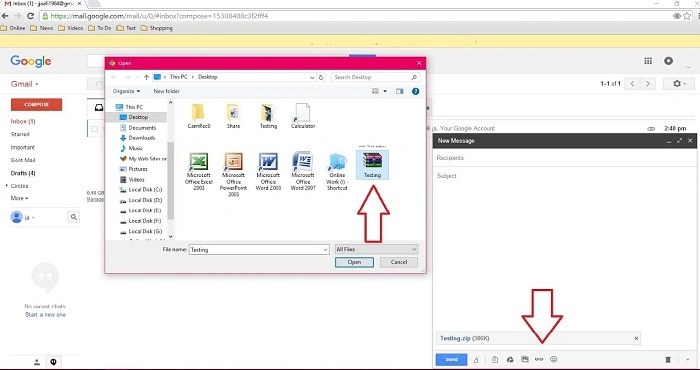
Steps
- Compress folder into ZIP
- Open Gmail
- Click Compose
- Attach ZIP file
- Send email
Very simple honestly.
How to ZIP a Folder on Windows
Usually:
- Right-click folder
- Choose:
“Send to → Compressed (zipped) folder”
Windows creates ZIP automatically.
Done.
How to ZIP a Folder on Mac
Mac users usually:
- Right-click folder
- Select “Compress”
Mac instantly creates a ZIP file.
Very easy honestly.
How to Send Folder Through Outlook
Microsoft Outlook works the same way.
Usually:
- ZIP folder first
- Attach ZIP file
- Send email normally
Simple honestly.
Why Email Apps Reject Large Folders
Because attachment limits exist.
Most services allow around:
20–25 MB attachments.
Large folders easily exceed this.
Gmail Attachment Size Limit
Usually:
25 MB max.
Anything larger?
Gmail suggests Google Drive instead.
Outlook Attachment Limits
Usually around:
20–25 MB too.
Depends on account honestly.
What Happens If a Folder Is Too Large?
Usually:
- Upload fails
- Email won’t send
- Attachment gets rejected
Very frustrating honestly.
Best Solution for Huge Folders: Cloud Storage
Honestly?
Usually the smartest option.
Instead of attaching folder directly:
upload it online and share a link.
Best Cloud Services for Sending Folders
Popular options:
- Google Drive
- Dropbox
- OneDrive
- iCloud Drive
Very useful honestly.
How to Send Folder Through Google Drive
Usually:
- Upload folder to Drive
- Right-click folder
- Generate share link
- Email link to recipient
Done.
Why Google Drive Works So Well
Because it:
- Handles huge folders
- Keeps structure intact
- Allows easy downloads
- Avoids attachment limits
Very convenient honestly.
How Dropbox Folder Sharing Works
Dropbox works similarly.
Usually:
- Upload folder
- Create sharing link
- Send link by email
Simple honestly.
Can Recipients Download Entire Folders?
Yep.
Usually recipients can:
- Download ZIP version automatically
- Browse files online
- Save folder to own storage
Very flexible honestly.
Does ZIP Compression Reduce File Size?
Sometimes yes.
Especially for:
- Documents
- Text files
- Spreadsheets
But honestly?
Photos and videos often barely shrink because they’re already compressed.
Can ZIP Files Be Password Protected?
Absolutely.
Some ZIP tools allow:
- Passwords
- Encryption
- Secure sharing
Useful for sensitive folders honestly.
Why Companies Use ZIP Files Constantly
Businesses email ZIP folders all the time for:
- Projects
- Documents
- Design files
- Reports
- Source code
Keep everything organized honestly.
Can Phones Send Folder ZIP Files?
Yep.
Both Android and iPhone support:
- ZIP apps
- File compression
- Cloud sharing
Though computers are usually easier honestly.
How to ZIP Folders on Android
Usually through:
- Files app
- Compression apps
- Built-in archive tools
It depends on the phone honestly.
How to ZIP Folders on iPhone
iPhones now support ZIP creation too.
Usually:
- Open Files app
- Hold folder
- Tap Compress
Very handy honestly.
Can You Email Multiple Folders Together?
Absolutely.
Usually easiest to:
ZIP them together first.
Makes uploads cleaner honestly.
Why Large Video Folders Cause Problems
Video files are huge now.
Especially:
- 4K footage
- Phone videos
- Editing projects
Often too large for email honestly.
Cloud storage works way better.
Best File Types for ZIP Sharing
Usually:
- Documents
- PDFs
- Office files
- Images
- Small projects
work very smoothly.
Can ZIP Files Trigger Spam Filters?
Sometimes slightly.
Especially if:
- Password protected
- Unknown sender
- Suspicious file names
Corporate systems sometimes block ZIP files too.
Why Some Companies Block ZIP Attachments
Security honestly.
Hackers often hide:
- Malware
- Viruses
- Dangerous scripts
inside ZIP files.
Best Practices Before Sending ZIP Folders
Want smoother sending?
Do this stuff.
Rename Folder Clearly
Avoid messy names honestly.
Remove Unnecessary Files
Keeps size smaller.
Check ZIP Before Sending
Make sure everything works.
Use Cloud Sharing for Huge Folders
Much easier honestly.
Warn Recipient About Large Downloads
Helpful for slower internet.
Common Folder Sending Mistakes
People hit these constantly.
Trying to Attach Raw Folder Directly
Most common honestly.
Sending Massive Files Through Email
Attachment limits stop them.
Forgetting to Compress Folder
Causes upload problems.
Wrong Sharing Permissions
Recipients can’t access the folder.
Forgetting Important Files
Always double-check honestly.
Can You Edit Shared Cloud Folders Later?
Yep.
Cloud storage allows:
- Updating files
- Adding documents
- Removing access
- Changing permissions
Very useful honestly.
Are Cloud Folder Links Safe?
Usually yes with trusted services.
Still smart to:
- Use passwords
- Restrict access
- Avoid public sharing
Especially for private data.
Difference Between Attachment and Cloud Link
People confuse these too.
Attachment
File travels inside email itself.
Cloud Link
Email contains download links instead.
Cloud links work much better for large folders honestly.
Can Recipients See Folder Structure?
Usually yes.
ZIP files preserve:
- Subfolders
- Organization
- File arrangement
Very helpful honestly.
How Long Do Cloud Folder Links Last?
Depends on service honestly.
Some stay active forever.
Others expire after:
- Days
- Downloads
- Manual deletion
Why Folder Uploads Sometimes Fail
Usually because of:
- Weak internet
- Huge file size
- Browser issues
- Storage limits
Large folders need patience honestly.
FAQs About Sending Folders Through Email
Can you attach a folder directly to email?
Usually no.
How do you send folders through email?
Usually by compressing into ZIP first.
Does Gmail allow ZIP attachments?
Yep within attachment size limits.
What’s the best way to send huge folders?
Cloud storage links honestly.
Can phones create ZIP files?
Absolutely.
Does ZIP compression reduce size?
Sometimes slightly.
Why won’t my folder upload?
Usually attachment limits or unsupported folder structure.
Are ZIP files safe?
Usually yes if from trusted sources.
Sending folders through email honestly sounds harder than it really is.
Most of the time, the trick is simply:
turning folders into ZIP files first.
Once compressed, email apps handle them way better.
And for really huge folders?
Cloud storage honestly becomes the easiest solution by far.
Because instead of fighting attachment errors and upload failures…
You can simply:
- Upload once
- Share link
- Let recipients download everything easily
Way smoother honestly.
