
Ever forwarded an email and instantly got nervous afterward?
Like maybe two seconds after clicking Send?
Yeah. That little panic hits people all the time.
Especially when the email contains:
- Private conversations
- Work discussions
- Screenshots
- Attachments
- Gossip honestly
- Sensitive information
Then suddenly your brain starts asking:
“Can they tell I forwarded this?”
“Do they know when I forwarded it?”
“Will Gmail notify them or something?”
A lot of people think email works like social media apps now.
You know:
- Screenshot alerts
- Seen receipts
- Share notifications
But email is actually way more old-school than that.
And honestly?
Most email systems don’t directly tell people when you forward their messages.
Still, forwarding isn’t completely invisible either.
There are definitely ways people can figure things out accidentally.
What Does Forwarding an Email Mean?
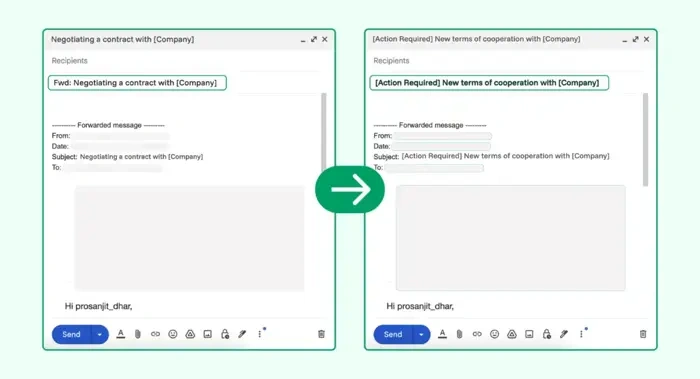
Forwarding simply means taking an email someone sent you. Then sending it to someone else.
Instead of rewriting everything manually. You can:
- Open email
- Click Forward
- Add new recipient
- Send it
Pretty simple honestly.
The forwarded message often includes:
- Original email
- Sender information
- Attachments
- Timestamps
- Reply chains
Basically you’re passing the email along.
Can People See When You Forward an Email?
Usually?
Nope.
Most email services:
- Gmail
- Outlook
- Yahoo Mail
- Apple Mail
…do not notify people when you forward their messages.
That means the original sender usually cannot directly see:
- If you forwarded it
- Who you sent it to
- When you forwarded it
No alerts appear normally.
Why People Think Email Sends Forward Notifications
Honestly?
Apps like:
- Snapchat
- Messenger
…made people paranoid about sharing activity.
Those apps sometimes track:
- Screenshots
- Shares
- Reads
- Reposts
Email systems mostly don’t work that way.
They’re much older technology.
Does Gmail Notify Someone If You Forward Their Email?
Nope.
Gmail does not normally send forwarding notifications.
So if you forward:
- Photos
- Conversations
- Documents
- Attachments
…the original sender won’t get:
- Popup alerts
- Warning emails
- Notifications
Pretty private overall.
Does Outlook Tell People About Forwards?
Usually not too.
Microsoft Outlook doesn’t normally notify senders either.
But workplace systems may be different sometimes.
Especially companies using:
- Microsoft Exchange
- Microsoft 365 security tools
Those may track forwarding internally.
What Can the Recipient of the Forward See?
Quite a lot honestly.
Forwarded emails usually show:
- Original sender name
- Email address
- Date and time
- Attachments
- Previous replies
So while the sender may not know you forwarded it…
The new recipient often sees exactly where it came from.
Can They See the Exact Time You Forwarded It?
Sometimes indirectly.
The forwarded email itself may include:
- Your send timestamp
- Forwarded message date
- Email metadata
So the person receiving the forward can usually see:
when you sent it to them.
But the original sender usually cannot.
Can Forwarded Emails Include Entire Conversations?
Absolutely yes.
And honestly?
This causes problems constantly.
Long email chains may include:
- Old replies
- Private comments
- Other recipients
- Hidden discussions
- Sensitive information
Always check threads carefully before forwarding.
Do Attachments Stay in Forwarded Emails?
Usually yes.
Attachments normally travel with the forward automatically.
That includes:
- PDFs
- Photos
- Videos
- Documents
- Screenshots
Easy thing to overlook honestly.
Can You Remove Attachments Before Forwarding?
Yep.
Most email apps let you:
- Delete attachments
- Remove images
- Edit content
before sending.
Very smart habit honestly.
Can Someone Accidentally Discover You Forwarded Their Email?
Oh definitely.
Just not through automatic notifications usually.
Common Ways People Find Out
Reply Accidents
Biggest one honestly.
Someone replies incorrectly and includes the original sender.
Super awkward.
Shared Screenshots
Forwarded content spreads around.
Mentioned in Conversation
People talk.
Especially at work.
Re-Forwarding
Forwarded emails sometimes travel back to the original sender later.
Happens more than you’d think.
Can Businesses Track Forwarded Emails?
Sometimes yes.
Especially on work systems.
Companies often monitor:
- Outgoing emails
- Attachments
- External forwarding
- Sensitive data sharing
Corporate email is rarely fully private honestly.
Can Workplaces See When You Forward Emails?
Often yes internally.
Security systems may log:
- Time sent
- Recipient
- Attachments
- External forwarding activity
Especially in:
- Banks
- Government jobs
- Large companies
- Healthcare organizations
Difference Between Reply and Forward
People mix these up constantly.
Reply
Send a message back to the original sender.
Forward
Send messages to new people.
Huge difference honestly.
What Happens If Someone Replies to a Forwarded Email?
Usually replies come back to:
- You, the forwarder
But sometimes:
- Old addresses remain
- Reply All gets messy
- Original sender accidentally gets included
Very common email disaster honestly.
Is Forwarding Emails Private?
Mostly yes.
But not completely.
Because once you forward something:
- Recipient may share again
- Screenshots happen
- Copies spread easily
You lose control pretty quickly.
Can You Forward Emails Secretly?
Mostly yes.
Since normal email systems don’t send alerts:
- Forwarding stays quiet
- No notifications happen
- Nobody automatically knows
But indirect discovery still happens sometimes.
Is It Safe to Forward Emails?
Depends what you’re forwarding honestly.
Harmless information?
Usually fine.
Sensitive information?
Could become risky.
Especially:
- Financial details
- Password resets
- Medical records
- Work secrets
- Personal conversations
Think carefully first.
Can Deleted Forwarded Emails Be Removed?
Only your copy.
Once someone receives the forwarded email:
- They keep their version
- You cannot remotely erase it
Same as regular email behavior.
Automatic Email Forwarding Explained
Some people enable automatic forwarding.
This means:
Used often for:
- Backup accounts
- Business transitions
- Shared inboxes
Can Automatic Forwarding Cause Problems?
Absolutely.
Wrong settings may accidentally leak:
- Private emails
- Work messages
- Sensitive attachments
Always double-check forwarding rules honestly.
Can Encrypted Emails Be Forwarded?
Sometimes not easily.
Secure systems may restrict:
- Forwarding
- Copying
- Downloading
Mostly used in secure workplaces.
Common Email Forwarding Mistakes
People mess this up constantly.
Forgetting Old Reply Chains
Huge privacy problem.
Wrong Recipient
Autocomplete creates chaos.
Leaving Sensitive Information Visible
Very common honestly.
Forgetting Attachments
Classic mistake.
Replying Instead of Forwarding
Easy error when rushing.
Best Practices Before Forwarding Emails
Want safer forwarding?
Do this stuff.
Read Entire Conversation First
Seriously important.
Also Read: Can You Email a Phone Number? Here’s How It Actually Works
Remove Private Information
Delete unnecessary details.
Check Attachments Carefully
Wrong files cause disasters.
Verify Recipient
Double-check addresses.
Think Before Sending
Especially emotional conversations.
FAQs About Forwarding Emails
Can people see when you forward an email?
Usually no.
Does Gmail notify people about forwards?
Nope.
Can Outlook track forwarded emails?
Personal accounts usually do not. Work systems sometimes yes.
Can recipients see original sender information?
Yep. Usually full details stay visible.
Can forwarded emails include old conversations?
Absolutely.
Do attachments stay when forwarding?
Usually yes unless removed.
Can workplaces monitor forwarded emails?
Often yes on company systems.
Is forwarding private?
Mostly, but copies can spread easily afterward.
Most people cannot directly see when you forward their emails.
Services like Gmail and Outlook normally keep forwarding private without sending notifications at all.
But honestly?
Forwarded emails often reveal way more information than people realize.
Names. Attachments. Email addresses. Timestamps. Entire reply chains.
That’s why checking everything carefully before forwarding matters so much.
Because once an email gets forwarded around…
You usually lose control over where it goes next.
