
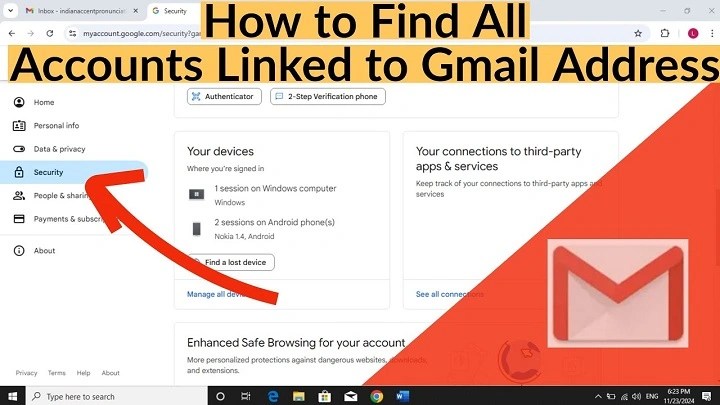
You sign up for websites, apps, newsletters, stores, games, subscriptions, and free trials. Over the years, your email collects digital footprints everywhere. Then one day, you start wondering. How many accounts are actually connected to my email address? What services still have my data. What forgotten profiles or old subscriptions are still active under my email.
This is where people ask the same important question. How can I find all accounts linked to my email for free? The good news is that you can reveal a huge amount of information using simple built-in tools from Google, Outlook, social platforms, and popular services you already use.
This guide explains exactly how to find every service connected to your email address, how to check logins, linked apps, saved accounts, permissions, subscriptions, and hidden profiles using free methods only. All in a simple, practical, step-by-step style just like your demo.
Why Accounts Link to Your Email Address Automatically
Every time you sign up for something online, your email becomes the key that identifies your profile.
Meaning:
- Services store your email as your login
- Apps use your email for recovery
- Websites send verification messages
- Old accounts stay active even if you forget them
- Your email becomes a permanent trail for all online activity
Because of this, you can use your email’s built-in tools to track everything that has ever connected to it.
Check All Accounts Linked to Your Google Email (Gmail)
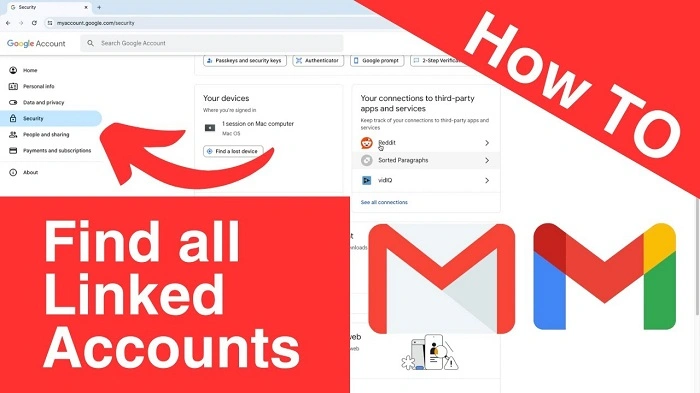
Use this when you want a full list of apps, sites, and services connected to your Gmail.
Steps
- Go to your Google Account
- Open Security
- Scroll to Third-party apps with account access
- Click Manage third-party access
- Review every site and app connected to your Gmail
- Remove anything you do not recognize
Why this works: Google tracks every login made using the Sign in with Google button. This is one of the easiest ways to find forgotten accounts.
Check All Accounts Linked to Your Outlook, Hotmail, or Live Email
Use this if you use Outlook or Microsoft accounts.
Steps
- Open your Microsoft Account
- Click Privacy
- Choose Apps and services
- Review every app connected to your Microsoft email
- Remove access from old sites and unused services
Why this works: Every time you use Sign in with Microsoft, the service stays listed in your permissions.
Search Your Email Inbox for Account Creation Emails
This method helps you uncover old accounts going back years.
Steps
- Open your email inbox
- Use search terms:
- Welcome
- Verify email
- Confirm your account
- Activate your account
- Account created
- Welcome
- Review each result
- List all services you recognize and delete anything you do not want
Why this works: Almost every online account sends a welcome or confirmation email that stays searchable forever.
Use Password Managers to Find Linked Accounts
Password managers reveal accounts you forgot you created.
Steps
- Open your browser’s password manager
- Check passwords saved in Chrome, Edge, Firefox, or Safari
- Review login entries
- Delete old or unused accounts
- Reset passwords for suspicious ones
Why this works: Browsers automatically store logins, creating a full list of accounts tied to your email.
Check Your Social Login Connections
Social platforms track every app or website you log into using social buttons.
Steps (Facebook)
- Open Settings
- Click Apps and Websites
- Review Active and Expired logins
- Remove anything unknown
Steps (Apple ID)
- Go to Apple ID
- Open Password & Security
- View Apps Using Apple ID
- Check each connection
Why this works: Many people log in using social accounts without realizing the number of connections created.
Check Data Brokers and Breach Databases (Free Tools)
These reveal old accounts exposed in past breaches.
Steps
- Visit Have I Been Pwned
- Enter your email
- See what websites your email appears in
- Visit those websites and delete accounts if needed
Why this works: Breach reports often expose long-forgotten accounts from years ago.
Troubleshooting: Why You Cannot Find All Accounts at Once
| Issue | Why It Happens | Fix |
| No single dashboard | Accounts exist across many platforms | Check each platform separately |
| Old accounts without welcome emails | Some services skip verification | Use password manager instead |
| Deleted emails remove clues | Harder to trace past logins | Use breach tools |
| No login via social buttons | Cannot check social connections | Use inbox search |
| Different emails used | Accounts may be spread across addresses | Repeat steps for each email |
When You Should Clean Up Accounts Linked to Your Email
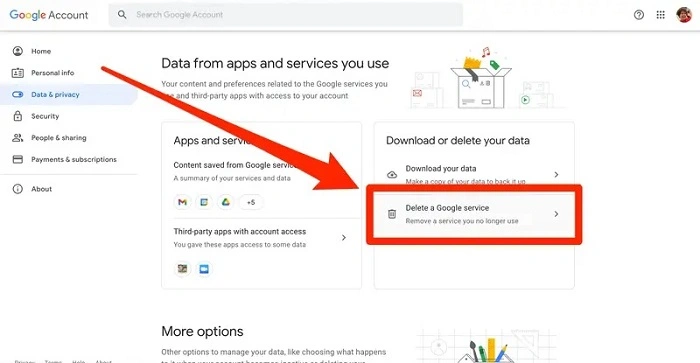
- Strange login alerts
- Too many subscriptions
- Old accounts leaking data
- Credibility or security concerns
- Outdated shopping accounts
- Lost access to old platforms
- Duplicate accounts across services
Cleaning up reduces security risks and helps you manage your digital life.
Also Read: Shopify Support Email: The 2025 Step-by-Step Usher That Shows You How to Reach Real Help Fast
Pro Tips to Manage Linked Accounts Easily
Use these habits to keep everything safe and organized:
- Use one password manager for all accounts
- Avoid using your main email for random sign-ups
- Create a separate email for newsletters and trials
- Enable two-factor authentication everywhere
- Delete accounts you no longer use
- Review third-party app access every few months
- Keep a personal list of important services
This helps you avoid losing track of your online footprint.
Quick Actions Summary
| Action | Steps |
| Find accounts via Gmail | Google Account → Security → Third-party access |
| Find accounts via Outlook | Microsoft Account → Privacy → Apps and services |
| Search inbox for sign-ups | Search: welcome, verify, confirm |
| Use password manager | Browser settings → Passwords list |
| Check social logins | Facebook or Apple ID → Apps and websites |
| Use breach tool | Have I Been Pwned → enter email |
| Clean up accounts | Delete, reset, remove app access |
Frequently Asked Questions
How can I find all accounts linked to my email for free
Use Google, Microsoft, password managers, inbox searches, and breach tools.
Can I see every account created with my email in one place
No. You must check through several linked-system dashboards.
How do I find old accounts I forgot
Search your inbox for welcome emails or use breach tools to reveal old registrations.
Can I delete accounts linked to my email
Yes. Visit each service individually and delete or deactivate your profile.
How can I secure accounts linked to my email
Enable two-factor authentication and update old passwords.
