
Ever needed to send one email to a bunch of people?
Maybe:
- Work clients
- Customers
- Teachers
- Students
- Party guests
- Job contacts
- Team members
And then suddenly you realize something awkward:
“Wait… if I send this normally, everyone can see everybody else’s email.”
Yeah.
That gets uncomfortable fast honestly.
Nobody likes their email address getting shared with strangers accidentally.
And honestly?
Big messy recipient lists just look unprofessional too.
That’s why people try sending the same email separately instead.
Meaning:
every person gets their own version privately.
Way cleaner.
Way safer.
Way more professional honestly.
The good news?
Modern email apps make this pretty easy once you know the tricks.
Let’s walk through exactly how to send the same email to multiple recipients separately without causing privacy disasters.
What Does Sending Emails Separately Mean?
It means:
each person receives their own private copy of the email.
They cannot see:
- Other recipients
- Email lists
- Group members
- Hidden addresses
To them, it feels like:
you emailed only them.
Very useful honestly.
Why People Send Separate Emails
Lots of good reasons honestly.
Privacy
Biggest reason easily.
People don’t want strangers seeing their email addresses.
Professional Appearance
Huge recipient lists look messy.
Private emails feel cleaner and more personal.
Better Engagement
People respond more often when emails feel direct.
Avoiding Reply-All Chaos
Everybody hates giant reply-all chains honestly.
Security Reasons
Some industries legally require privacy protection.
Very important for businesses.
Difference Between To, CC, and BCC
People confuse these constantly.
To Field
Everyone sees all recipients.
CC Field
Same thing basically.
Everybody sees everybody.
BCC Field
This is the magic option.
Recipients stay hidden from each other.
Very important honestly.
What Does BCC Mean?
BCC means:
Blind Carbon Copy.
When you place recipients in BCC:
- They receive email normally
- They cannot see each other
- Replies come back only to you
Simple and useful honestly.
Is BCC the Same as Sending Separate Emails?
Not exactly.
BCC sends:
one email privately to many people.
True separate sending means:
individual customized emails for each person.
But honestly?
BCC works great for most situations.
How to Send Same Email Separately Using Gmail
Gmail makes this easy.
Steps
- Open Gmail
- Click Compose
- Put your own email in To field
- Click BCC
- Add recipients in BCC
- Write email
- Send
Done.
Everybody gets a private copy.
Why Put Your Own Email in To Field?
Because some email systems require:
something in the To field.
Also looks cleaner honestly.
How to Send Same Email Separately in Outlook
Microsoft Outlook works similarly.
Steps
- Open Outlook
- Create New Email
- Enable BCC field
- Add recipients
- Send email
Very simple honestly.
How to Enable BCC in Outlook
Sometimes BCC stays hidden.
Usually:
- Open new message
- Click Options
- Enable BCC
Done.
How Yahoo Mail Handles BCC
Yahoo also supports:
BCC sending.
Same process honestly:
- Create email
- Add BCC recipients
- Send privately
Easy enough.
Can Apple Mail Send Separate Emails?
Yep.
Apple Mail supports:
- BCC
- Group emailing
- Multiple recipients
Very similar process honestly.
Can Recipients Tell They’re in BCC?
Usually no.
Recipients normally cannot see:
- Other recipients
- Hidden addresses
- Total recipient count
Very private honestly.
Why BCC Is So Important
Because forgetting BCC creates:
massive privacy mistakes honestly.
Everybody suddenly sees:
- Customer emails
- Personal contacts
- Business lists
Very awkward.
Sometimes even legal problems happen.
What Is Mail Merge?
Mail merge is more advanced email sending.
Instead of one identical message, mail merge creates:
personalized emails automatically.
Each person may see:
- Their name
- Company name
- Custom details
Looks way more personal honestly.
Why Businesses Use Mail Merge
Because personalized emails:
- Feel human
- Get more replies
- Avoid spam appearance
- Look professional
Huge advantage honestly.
Gmail Mail Merge Tools
Popular Gmail mail merge tools include:
- GMass
- Mailmeteor
- Yet Another Mail Merge
- MergeMail
Very common for businesses.
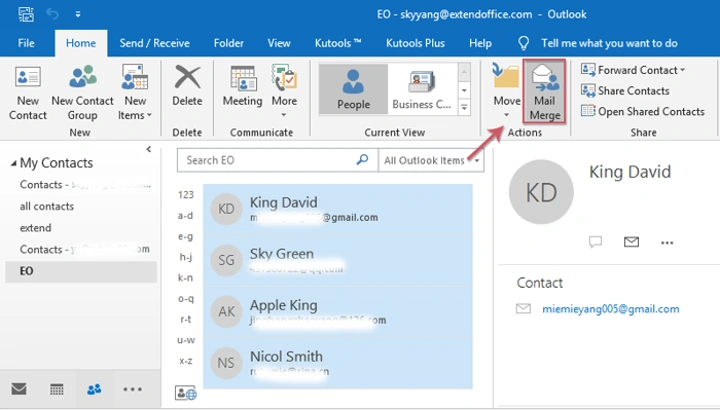
Outlook Mail Merge
Outlook works with:
Microsoft Word mail merge.
Very popular in offices honestly.
Useful for:
- Invitations
- Newsletters
- Customer updates
- Job outreach
Difference Between BCC and Mail Merge
People mix these up constantly.
BCC
One email privately sent to many people.
Mail Merge
Separate personalized emails automatically generated.
Mail merge feels much more personal honestly.
Which Is Better?
Depends honestly.
BCC Works Best For
- Quick announcements
- Family updates
- Small groups
- Event invitations
Mail Merge Works Best For
- Business outreach
- Marketing
- Customer emails
- Professional campaigns
Can Sending Too Many Emails Trigger Spam Filters?
Absolutely yes.
Email providers watch for:
- Mass sending
- Spam behavior
- Suspicious patterns
Especially if:
- Too many links exist
- Huge recipient lists appear
- People mark emails as spam
Gmail Sending Limits
Gmail usually limits:
daily outgoing emails.
Personal accounts often allow around:
500 emails daily.
Business accounts may allow more.
Why Bulk Emails Go to Spam Sometimes
Common reasons:
- Too many recipients
- Spammy subject lines
- Excessive links
- Large attachments
- Poor sender reputation
Very frustrating honestly.
Best Practices for Sending Bulk Emails
Want better results?
Do this stuff.
Use Clear Subject Lines
Avoid spammy phrases honestly.
Keep Emails Short
People skim quickly.
Personalize When Possible
Even first names help a lot.
Avoid Huge Attachments
Spam filters dislike them.
Double-Check Recipients
Privacy mistakes are painful.
Test Email First
Always smart, honestly.
Should Businesses Use Email Marketing Platforms?
Usually yes.
Popular services include:
- Mailchimp
- ConvertKit
- Brevo
- Constant Contact
These help with:
- Deliverability
- Templates
- Unsubscribe links
- Analytics
Much easier for large campaigns honestly.
Why Privacy Matters in Group Emails

Because exposing email addresses can:
- Violate trust
- Create spam risks
- Cause complaints
- Look unprofessional
Businesses must be especially careful.
Also Read: “This Could Have Been an Email” Explained: Why People Keep Saying It
Can Recipients Reply to BCC Emails?
Yep.
But replies usually come only to:
you.
Other BCC recipients stay hidden.
Very useful honestly.
Can You Send Attachments to Multiple Recipients Separately?
Absolutely.
Attachments usually work fine with:
- BCC
- Mail merge
- Individual emails
Though large files may trigger spam filters.
Cloud Links Sometimes Work Better
Instead of attaching huge files:
use:
- Google Drive
- OneDrive
- Dropbox
Cleaner honestly.
Common Mistakes When Sending Group Emails
People mess this up constantly.
Forgetting BCC
Biggest mistake honestly.
Using CC Instead of BCC
Everybody suddenly sees everybody else.
Sending Too Fast
Spam filters trigger.
Generic Emails
Feels robotic.
Wrong Recipient
Autocomplete creates chaos.
Legal Rules Around Bulk Emailing
Businesses often must follow laws requiring:
- Unsubscribe options
- Honest sender information
- Non-deceptive subject lines
Important honestly.
FAQs About Sending Same Emails Separately
What does BCC mean?
Blind Carbon Copy. Recipients stay hidden.
Can BCC recipients see each other?
Nope.
Is BCC professional?
Absolutely yes.
Is mail merge better than BCC?
Depends. Mail merge feels more personal.
Can Gmail send separate emails?
Yep using BCC or mail merge tools.
Can bulk emails go to spam?
Definitely if done poorly.
Why should I avoid CC for big groups?
Because everybody sees everybody else’s email.
Can people tell they’re in BCC?
Usually no.
Sending the same email to multiple recipients separately is honestly one of the most useful email skills you can learn.
It protects privacy.
Looks professional.
Avoids awkward mistakes.
And keeps inboxes much cleaner for everybody.
For quick simple sending?
BCC works great.
For business or personalized outreach?
Mail merge tools work even better.
And honestly?
Once you accidentally expose everyone’s email addresses one time…
You never forget to use BCC again.
