
We’ve all had that moment honestly.
You hit Send…
Then immediately realize:
- Wrong attachment
- Wrong person
- Huge typo
- Missing file
- Angry message
- Embarrassing mistake
And your brain instantly screams:
“NOOOO.”
Then comes the panic.
“Can I unsend this email somehow?!”
Honestly?
This happens way more than people admit.
Especially now when emails move insanely fast.
One click and suddenly your message is flying across servers before your brain even catches up.
The good news?
Sometimes yes.
You actually can unsend an email.
But honestly?
There are limits people don’t realize.
Because email doesn’t work exactly like:
- Messenger
- Snapchat
Email systems are older and a bit messier honestly.
Let’s break down exactly how unsending emails works, when it succeeds, and when it’s already too late.
Is It Actually Possible to Unsend an Email?
Sometimes yes.
But usually only:
for a very short time.
Most email systems don’t truly “erase” sent emails after delivery.
Instead:
they delay sending briefly or attempt recalls.
Big difference honestly.
What Happens When You Send an Email?
Usually:
- You hit Send
- Email uploads to outgoing server
- Server routes message
- Recipient receives copy
Once the recipient gets their own copy?
Things become much harder honestly.
Difference Between Undo Send and Recall
People confuse these constantly.
Undo Send
Stop email before full delivery.
Usually works only for seconds.
Recall Email
Attempts to pull messages back after sending.
Much less reliable honestly.
How Gmail Undo Send Works
Gmail honestly handles this pretty smartly.
But here’s the trick:
Gmail doesn’t truly yank emails back after delivery.
Instead:
it delays sending briefly.
What Happens in Gmail
After hitting Send:
Gmail waits a few seconds before actually sending.
During that window:
you can cancel it.
Very clever honestly.
How Long Gmail Undo Send Lasts
Usually:
- 5 seconds
- 10 seconds
- 20 seconds
- 30 seconds max
Depends on your settings.
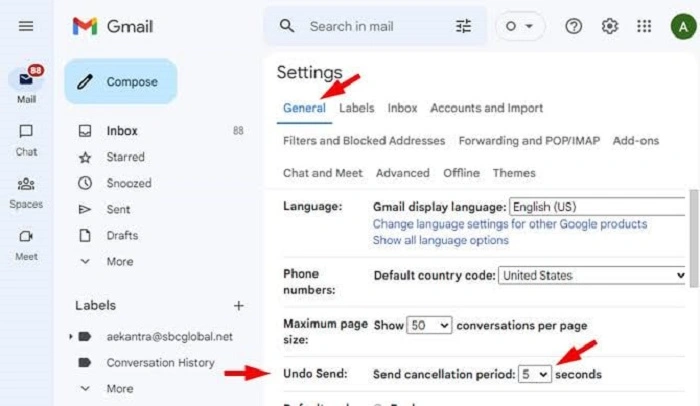
How to Enable Longer Undo Time in Gmail
Usually:
- Open Gmail Settings
- Go to General
- Find Undo Send
- Choose delay length
- Save settings
Most people choose 30 seconds honestly.
What Happens If You Miss the Undo Window?
Then honestly?
Email is probably gone.
Once Gmail fully delivers it:
you can’t truly unsend it anymore.
The recipient already has their copy.
Does Gmail Notify Someone If You Undo Send?
Nope.
The recipient usually never knows the email existed.
Because technically:
it was never fully sent.
How Outlook Recall Works
Microsoft Outlook handles unsending differently.
Outlook uses:
Recall This Message.
Honestly though?
It’s much less reliable than Gmail Undo Send.
When Outlook Recall Works
Usually only if:
- Both users use Microsoft Exchange
- Same organization/company
- Recipient hasn’t opened email yet
Very specific honestly.
When Outlook Recall Fails
Often fails if:
- Recipient already opened email
- Different email provider used
- Mobile apps involved
- Email left company server
Which honestly happens a lot.
Can Outlook Recalls Notify Recipients?
Sometimes awkwardly yes.
Recipient may even receive:
message recall attempt notifications.
Very embarrassing honestly.
How to Recall an Email in Outlook
Usually:
- Open Sent Items
- Open email fully
- Click File
- Select Resend or Recall
- Choose Recall This Message
Then Outlook attempts retrieval.
Does Yahoo Mail Allow Unsend?
Yahoo Mail honestly doesn’t offer true unsend features like Gmail.
Once an email is sent?
Usually done.
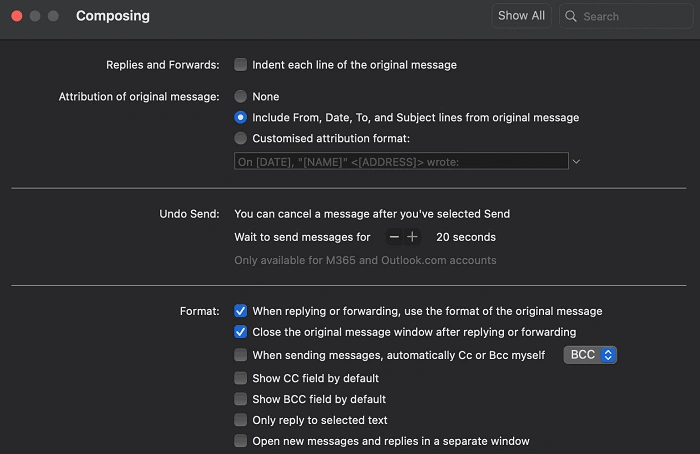
Does Apple Mail Have Undo Send?
Apple Mail now supports Undo Send in newer versions.
Usually a short time window.
Similar to Gmail approach.
Also Read: Folder Through Email Without Getting File Errors
Can You Unsend Emails After Hours?
Honestly?
Usually no.
By then the recipient definitely has a message already.
Undo windows are very short intentionally.
Why True Email Unsend Is Difficult
Because email systems are decentralized.
Once message reaches:
- Recipient server
- Inbox
- Device
…you lose control honestly.
Unlike messaging apps that store chats centrally.
Can Someone Still Read Recalled Emails?
Sometimes yes honestly.
Especially if:
- Preview notifications showed message
- Email already downloaded
- Recipient opened quickly
Recall isn’t magic.
Can You Delete a Sent Email From the Recipient Inbox?
Usually no.
Deleting from your own:
- Sent folder
- Trash
- Inbox
doesn’t affect recipient copies.
Huge misunderstanding honestly.
What Happens If You Disconnect the Internet Quickly?
Sometimes it helps briefly honestly.
Especially if:
- Email upload incomplete
- Weak connection exists
But modern systems send very fast.
Rarely reliable.
Why Big Attachments Sometimes Delay Sending
Large files upload slower.
Which occasionally creates:
larger cancellation windows.
Still risky though honestly.
Best Way to Avoid Sending Bad Emails
Honestly?
Prevention beats recall every time.
Double-Check Recipients
Autocomplete causes disasters honestly.
Review Attachments
Classic mistake.
Read Emotional Emails Twice
Angry emails create regret fast.
Use Drafts First
Especially for serious topics.
Turn On Maximum Undo Time
Very smart honestly.
Common Reasons People Want to Unsend Emails
Happens constantly honestly.
Wrong Recipient
Most common honestly.
Missing Attachment
Classic office panic.
Typos
Sometimes hilarious. Sometimes horrifying.
Emotional Messages
Usually regretted quickly.
Wrong Information
Mistakes happen honestly.
Can Companies Monitor Recalled Emails?
Absolutely sometimes.
Corporate systems may log:
- Recall attempts
- Deleted messages
- Email activity
Especially workplaces.
Can Work Emails Be Truly Unsent?
Honestly?
Very hard.
Corporate backups and archives often preserve:
- Sent emails
- Deleted emails
- Recall attempts
Work systems remember a lot honestly.
Why Email Feels More Permanent Than Messaging Apps
Because honestly?
It usually is.
Emails often get:
- Archived
- Backed up
- Forwarded
- Downloaded
- Stored indefinitely
Very different from disappearing chats.
Can Automatic Email Forwarding Break Recall Attempts?
Absolutely yes.
If email already forwarded automatically:
recall usually becomes useless honestly.
Does Unsending Work on Phones?
Usually yes for Undo Send features.
Especially:
- Gmail mobile app
- Apple Mail
- Some Outlook versions
But timing matters massively honestly.
Common Unsend Mistakes
People mess this up constantly.
Waiting Too Long
Biggest issue honestly.
Assuming Delete Equals Unsend
Very common misunderstanding.
Forgetting Attachments
Classic email panic.
Trusting Outlook Recall Too Much
Honestly unreliable sometimes.
Panicking Instead of Following Up
Sometimes an apology email works better.
Best Practices After Sending Wrong Email
Move fast honestly.
Try Undo Immediately
Seconds matter.
Attempt Recall If Available
Worth trying.
Send Clarification Email
Professional honestly.
Stay Calm
People make mistakes constantly.
Learn From It
Everyone eventually sends bad emails honestly.
What If the Recipient Already Saw the Email?
Then honestly?
Damage control matters more than recall.
Usually better to:
- Apologize
- Correct mistake
- Clarify information
Professional handling matters more honestly.
FAQs About Unsending Emails
Can you really unsend an email?
Sometimes briefly with Undo Send features.
Does Gmail truly unsend emails?
Not exactly. It delays sending first.
How long does Gmail Undo Send last?
Usually up to 30 seconds.
Does Outlook recall always work?
Honestly, no. Very limited conditions.
Can recipients see recalled emails?
Sometimes yes.
Does deleting email unsend it?
Nope.
Can work emails be fully unsent?
Usually very difficult honestly.
What’s the safest way to avoid email mistakes?
Double-check before hitting Send honestly.
Unsending emails honestly works way less magically than people imagine. Most systems don’t truly erase messages after delivery.
Instead they either:
- Delay sending briefly
- Attempt limited recalls
And once the recipient fully gets the email?
Control mostly disappears honestly.
That’s why the best email habit honestly isn’t learning how to unsend messages…
It’s slowing down for five extra seconds before hitting Send in the first place.
