
Text messages are quick and hard to miss. Email? It’s great for long stuff with files. But here’s the cool part – you can send an email that shows up as a text.
AT&T lets you do this trick. Your email goes straight to someone’s phone as a text or MMS. It’s super handy for alerts, reminders, work stuff, and when you need to reach someone fast but don’t know their app.
In this guide, I’ll show you how this email-to-text thing works on AT&T, how to use it right, what goes wrong, and tips so your messages land just right.
What Is Email to Text on AT&T?
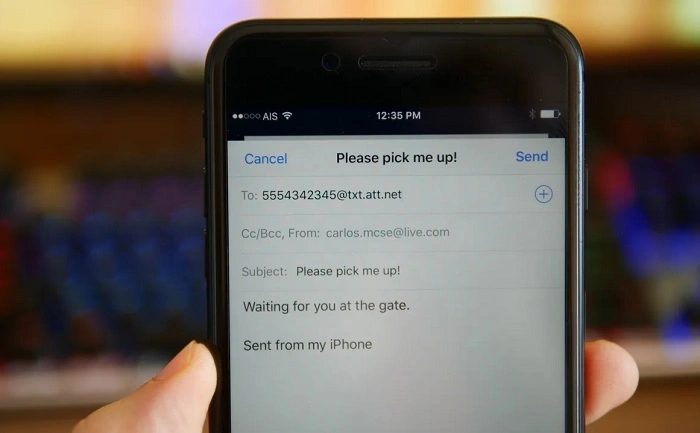
Email to text is pretty simple. You send an email, but it shows up as a text on someone’s phone. Instead of texting from your phone, you email a special address tied to their number.
For AT&T folks, their system turns your email into a text or MMS. It depends on how long it is and if you add files. The person gets it just like any text.
People use this for alerts, emergency stuff, and quick one-way messages.
How Email to Text Works Behind the Scenes
Want to know what happens when you hit send? Your email goes to AT&T’s special servers. They change it into text format.
Short emails? They become regular texts. Long ones with pics? They turn into MMS. If it’s too big or looks spammy, it might get blocked or cut short.
This whole thing takes just a few seconds. Pretty neat!
AT&T Email to Text Gateway Addresses
AT&T has special addresses for this. You gotta pick the right one.
AT&T SMS Gateway
This one’s for plain text only. Keep it short!
Format:
Example:
Best for quick, text-only notes.
AT&T MMS Gateway
This handles longer stuff and files.
Format:
Example:
Use this for longer messages, pics, or files.
When to Use SMS vs MMS Email Gateways
Picking SMS or MMS? It depends what you’re sending.
SMS rocks for quick alerts – like “Don’t forget!” or code numbers. MMS works better for longer stuff, pics, or fancy text.
Not sure? Go with MMS. It handles more stuff.
How to Send an Email to an AT&T Phone as a Text
Sending email to an AT&T phone is easy once you know how. No special apps needed!
Step-by-Step Instructions
Here’s how to do it right:
- open your email (any will work)
- hit Compose or New
- type their phone number plus the AT&T address
- write your message in the body
- keep the subject blank or super short
- hit send
Boom! They’ll get it in seconds.
Also Read: Abnormal Email Security Explained
Subject Lines and Message Formatting
Subject lines are weird with this. Sometimes they show up first in the text. Sometimes they mess things up.
My advice? Skip the subject. Put everything in the body.
Don’t use bullets or fancy text. Phones might show it all wonky.
Character Limits for AT&T Email to Text
You can’t send a novel here. There are limits!
SMS Character Limits
SMS texts max out at about 160 characters. That’s like two sentences! Go over? Your message gets chopped up.
MMS Size Limits
MMS gives you way more room. But huge files still won’t work.
Keep it short and sweet. Works better that way.
Can AT&T Customers Reply to Email-to-Text Messages?
Can they text back? Sometimes yes, sometimes no.
When it works, their reply goes to your email. But it might look weird or cut off.
Want back-and-forth chat? Test it first.
Common Uses for AT&T Email to Text
Lots of people use this feature. Let me show you how.
Personal Uses
Regular folks use it for family alerts, reminders, and quick notes when texting isn’t handy.
Business and Professional Uses
Companies love this for appointment reminders, system alerts, delivery updates, and urgent messages.
It’s perfect when your system already sends emails.
Security and Privacy Considerations
Here’s the thing – these messages aren’t super secure. No fancy encryption like some apps.
Your message might sit on servers for a bit. Got secrets? Use something else.
Why Email to Text Sometimes Doesn’t Work
Messages not going through? Don’t worry. Most fixes are easy.
Common Reasons for Failure
Here’s what usually goes wrong:
- wrong phone number (oops!)
- typed the gateway wrong
- message way too long
- files won’t work
- person blocked email texts
- spam filter caught it
Check these first. Usually fixes it!
How AT&T Customers Can Enable or Disable Email to Text
AT&T lets you control this feature. Nice!
Just log into your AT&T account. Find message settings. Some plans turn it off to stop spam.
Messages not arriving? Tell them to check this setting.
Email to Text and Spam Filtering
AT&T watches for spam in these messages. If yours looks like an ad, bye-bye!
Use normal words. Skip tons of links. Keep it short. Your message will get through.
Sending Attachments via Email to AT&T Text
Want to send files? Use the MMS gateway. Pictures work best. PDFs? Not so much.
Got an important file? Send a link instead. Works way better.
Email to Text vs Messaging Apps
Email-to-text isn’t trying to replace WhatsApp. They do different jobs.
This works without apps or logins. Perfect for alerts and one-way stuff.
Chat apps? Better for talking back and forth and sharing videos.
Troubleshooting Delivery Issues
Message didn’t arrive? Let’s fix it!
Quick Troubleshooting Checklist
Try these steps:
- double-check that phone number
- make sure you typed the gateway right
- make your message shorter
- ditch the attachments
- try MMS instead
- ask if they turned it on
Usually works after that!
Best Practices for Reliable Email to Text Messaging

Want your messages to always work? Follow these tips.
Writing Effective Email-to-Text Messages
Keep it simple. Just the facts. That’s it.
Skip emojis and weird punctuation. They might not show right.
Timing and Frequency
Don’t spam! Too many messages = blocked.
And maybe skip the 3 AM texts unless it’s urgent?
Email to Text for Automated Systems
Lots of computer systems use this for alerts. IT teams, hospitals, you name it.
Works best when messages stay short and similar each time.
Limitations of AT&T Email to Text
This isn’t perfect. Messages might not arrive. Formatting is basic. Users can block you.
Know the limits. Set your expectations right.
Is Email to Text Still Useful?
Even with all our apps, this still rocks. Why? Every phone gets texts. No setup needed.
For alerts and system messages? Still the best choice.
Quick Summary
Email to text on AT&T lets you email someone’s phone. It shows up as a text!
Use the right address. Keep it short. Know the limits. You’ll reach AT&T phones without regular texting.
Frequently Asked Questions (FAQs) About Cob Meaning Email
What is AT&T’s email-to-text address?
Use [email protected] for texts and [email protected] for MMS.
Can AT&T users reply to email-to-text messages?
Maybe! Replies might go to your email. Depends on settings.
Does email to text cost money?
Might count against their text plan. Check with them!
Why are my email-to-text messages not delivering?
Usually it’s the wrong address, too long, spam filters, or they turned it off.
Is email to text secure?
Nope. Don’t send private stuff this way.
