
Starting an email sounds easy, right? Till you sit there. The screen’s blank. Ten minutes pass. “Do I say Hi?” “Too casual maybe?”
“Should I use Dear?”
“Wait… is that weird now?”
Yeah. Email starts to stress people out. Way more than they should.
Even more when it’s:
- A work email
- A note to your boss
- A job letter
- A teacher
- A client
- Someone you just met
The first line? It counts. Big time. A good start makes you sound pro. Nice. Sure of yourself. Clear too. A bad one? Makes things weird. Real fast. But here’s good news. Starting emails gets super easy. You just need some simple rules. Let’s break it down.
Why the Start of an Email Matters
First looks happen fast.
Like, really fast.
Your email’s start sets the mood. For all of it.
It shows people:
- How formal you are
- How big a deal this is
- If you’re nice
- If you show respect
- If you sound sure
People judge emails in seconds. That’s the truth.
That’s why it starts to count so much.
What Makes a Good Email Opening?
Good email starts are:
- Clear
- Nice
- Natural
- Short
- Right for what’s happening
You don’t need big words.
Know what? Stiff emails sound like robots now.
Simple works best. Always.
The Basic Structure of Starting an Email
Most emails go like:
Hello + Name + First Line
Like:
“Hi Sarah,
Hope you’re doing great.”
Simple. Clean. Easy.
Best Greetings for Professional Emails
Let’s start with work emails.
Hi [Name]
Best choice today. By far.
Pro but not cold.
Like:
- Hi David,
- Hi Sarah,
- Hi Mr. Khan,
Works almost anywhere.
Hello [Name]
A bit more formal than Hi.
Still nice though.
Good for:
- Clients
- New people
- Work emails
- Big situations
Dear [Name]
More old-school.
Best for:
- Job letters
- Big business emails
- Teachers
- Official stuff
Still works great. Really.
Best Greetings for Casual Emails
Talking to friends? People you know well?
You can chill more.
Like:
- Hey Alex,
- Hi John,
- Hello all,
- Morning Sam,
Way more natural. For fun talks.
How to Start an Email to Someone You Don’t Know
This trips folks up. All the time.
Don’t know their name?
Good Options
- Hello,
- Dear Hiring Team,
- Hello Support Team,
- Hi there,
Don’t sound too stiff.
Should You Use “To Whom It May Concern”?
Real talk?
Only if you must.
Sounds super old now.
Try these:
- Hello Team,
- Dear Hiring Team,
- Hello Support,
Feels fresh. More natural.
Best Opening Lines After the Greeting
Said hello? What’s next?
Here’s where folks think too hard.
Simple Friendly Openings
These work great:
- Hope you’re doing well.
- Hope your week’s going great.
- Hope you’re having a nice day.
- Thanks for your time.
- I wanted to talk about…
Simple wins. Most times.
Professional Email Opening Examples
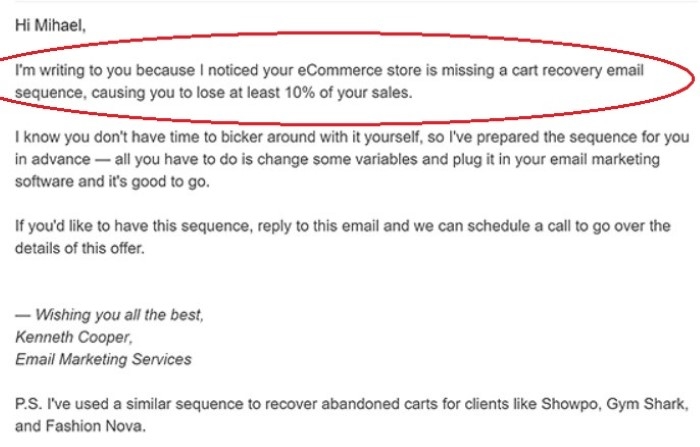
Here are some solid work ones.
Example 1
Hi Sarah,
Hope you’re doing well. I wanted to check on the meeting times.
Example 2
Hello Mr. Ahmed,
Thanks for your email. Let’s talk about the project news.
Example 3
Dear Hiring Team,
I’m writing about the marketing job on your site.
Clean. Pro. Easy to read.
Casual Email Opening Examples
Friends? Chill times? It sounds more natural.
Example 1
Hey Mike,
Just checking in. How’s it going?
Example 2
Hi Emma,
Hope your weekend was great!
Example 3
Hey all,
Just sharing pics from yesterday.
Way more chill.
How to Start a Job Application Email
Job emails? They count. A lot.
You want:
- Pro tone
- Clear point
- Sure voice
- Respect
Good Example
Dear Hiring Team,
Hope you’re doing well. I’m writing about the Designer job on your site.
Very safe choice.
How to Start an Email to a Professor
Teachers like nice emails. With respect.
Good Examples
- Dear Professor Rahman,
- Hello Professor Lee,
- Hi Dr. Ahmed,
Don’t use:
- Hey teach
- Yo professor
- Hi buddy
Yeah… just don’t.
How to Start an Email to Your Boss
Depends on your office. Really.
Most places are pretty chill now.
Usually:
- Hi [Name]
- Hello [Name]
…works just fine.
How to Start Customer Service Emails
Keep these simple. Direct too.
Example
Hello Support Team,
I need help with my recent order.
Quick. Clear.
Common Email Opening Mistakes
People mess this up. A lot.
Being Too Formal
Stuff like:
“Greetings of the day”
Sounds like a robot. Really.
Being Too Casual
“Yo dude”
Maybe not for work.
Misspelling Names
Big mistake.
Always check names. Twice.
Writing Huge Introductions
People don’t need five parts before your point.
Get to it.
Forgetting the Greeting Entirely
Jumping right to ask? Feels rude sometimes.
Should You Always Say “Hope You’re Doing Well”?
People joke about this line. A lot.
But you know what?
It’s still fine.
Simple nice starts work. They’re easy. Safe too.
You don’t need new greetings every email.
Alternatives to “Hope You’re Doing Well”
Want some change?
Try:
- Hope your week’s going smooth.
- Hope all is good.
- Hope things are great.
- Hope you’re having a good week.
- Thanks again for your help.
Small changes help. Makes emails feel fresh.
How Long Should an Email Opening Be?
Short.
Usually:
- One hello
- One quick nice line
That’s it.
Long starts are a waste of time. Really.
Can Emojis Be Used in Email Openings?
Depends a lot. On the place.
For work?
Skip them. Unless your office is super chill.
For friends?
Go for it.
Examples
Pro style:
Hi Sarah,
Chill style:
Hey Sarah 😊
Know your crowd.
How Cultural Differences Affect Email Greetings

Different places do email differently.
Some places like:
- Very formal hellos
- Titles and last names
- Nice words
Others are more chill.
Not sure?
Stay a bit more pro.
Safer that way.
Should You Use First Names?
Yes, most times now.
In modern offices? For sure.
But for formal stuff:
- Teachers
- Government folks
- Big bosses
…titles might work better.
How to Start Group Emails
Emailing many people?
Good picks:
- Hi all,
- Hello team,
- Good morning folks,
- Hi team,
Simple. Clean.
Starting Follow-Up Emails
Follow-up emails? Be nice. Not pushy.
Good Example
Hi David,
Just checking on my last email. About the project times.
Short. Nice.
How to Sound More Confident in Emails
Being sure matters.
Skip weak words like:
- Sorry to bug you
- This may be dumb
- I know you’re busy but…
Try these:
- I wanted to ask about…
- I’m checking on…
- I’d like your thoughts on…
Much better. Way stronger.
Best Email Greetings for Different Situations
Professional
- Hi [Name]
- Hello [Name]
- Dear [Name]
Casual
- Hey [Name]
- Hi [Name]
Group Emails
- Hello all
- Hi team
Formal Situations
- Dear Mr. Smith
- Dear Professor Lee
Email Opening Tips That Actually Help
Want better emails? Right now?
Do this stuff.
Keep It Natural
Write like a real person.
Match the Tone
Formal email? Stay pro.
Fun talk? Chill more.
Be Respectful
With new people? Always.
Don’t Overthink It
Really. Most people care way less than you think.
Read It Once Before Sending
Small mistakes show up fast.
FAQs
Is “Hi” professional in emails?
Yep. Totally normal now.
Should I use Dear or Hi?
Depends how formal. Both work.
Is “Hope you’re doing well” overused?
Maybe a bit. Still works fine though.
Can I start emails without greetings?
You can. But it might sound too quick.
What’s the safest professional greeting?
“Hi [Name]” works almost anywhere. Really.
Should I use emojis in work emails?
Skip them. Unless your office is super chill.
Is “Hey” too casual?
For formal stuff? Yeah, sometimes.
How long should email openings be?
Just one or two short lines. That’s it.
Starting emails? Doesn’t have to stress you out.
Most great email starts are super simple:
- A nice hello
- A short nice line
- Clear point
That’s it.
You don’t need big business words. Or super formal talk to sound pro. You know what? Natural and nice works best. Usually. And once you get comfy with some good hellos? Starting emails gets way easier. No more blank screen staring.
