
Deleting an email address sounds simple at first.
Then suddenly you realize:
Wait…
Are you deleting:
- The actual email account?
- A saved contact?
- An autofill suggestion?
- A connected account in Outlook?
- A Gmail address from your phone?
Yeah. Things get confusing fast honestly.
A lot of people search “how to delete an email address” when they really mean completely different things.
Sometimes they want to:
- Remove old contacts
- Stop autofill suggestions
- Delete a Gmail account
- Remove old work email
- Disconnect email from Outlook
- Get rid of hacked accounts
Different problem every time.
And honestly?
Deleting the wrong thing can become a huge headache if you aren’t careful.
So let’s break down every major type of email address deletion and how it actually works.
What Does “Deleting an Email Address” Mean?

This phrase can mean several totally different things.
Deleting a Contact
Removing someone’s saved email from contacts.
Removing Autofill Suggestions
Deleting email suggestions that pop up while typing.
Removing an Email Account From a Device
Disconnecting account from Outlook, phone, or Mail app.
Permanently Deleting an Email Account
Completely erasing the actual email address forever.
Big difference honestly.
How to Delete an Email Address From Gmail Contacts
Let’s start with contacts.
Gmail stores contacts automatically sometimes.
Steps
- Open Google Contacts
- Find contact
- Click three dots
- Select Delete
Done.
Very easy honestly.
Why Gmail Saves Random Email Addresses
Because Gmail auto-saves people you email often.
Which creates:
- Old addresses
- Mistyped emails
- Random autofill suggestions
Super annoying sometimes honestly.
How to Delete Gmail Autofill Email Suggestions
This confuses people constantly.
On Desktop
Usually:
- Start typing email
- Highlight suggestion
- Press X or Delete
Simple honestly.
On Mobile
May require:
- Clearing contact
- Removing saved recipient
- Clearing app data sometimes
Depends on device.
How to Delete an Email Address From Outlook
Microsoft Outlook saves contacts and autofill separately sometimes.
Delete Contact in Outlook
Usually:
- Open People/Contacts
- Select contact
- Delete it
Remove Outlook Autofill Suggestions
Usually:
- Start typing address
- Hover suggestion
- Click X
Quick fix honestly.
Why Outlook Keeps Old Email Addresses
Outlook remembers:
- Previous recipients
- Old contacts
- Cached addresses
Even deleted contacts may still appear sometimes.
How to Remove an Email Account From Outlook
Different from deleting contact.
This disconnects the actual email account from the Outlook app.
Steps
- Open File
- Account Settings
- Select account
- Remove account
Done.
Emails may still exist on provider servers though.
Does Removing Outlook Account Delete Emails Permanently?
Usually no.
Removing account from Outlook normally just:
- Disconnects app
- Removes syncing
Actual emails still stay on:
- Gmail
- Outlook servers
- Yahoo Mail
unless separately deleted.
How to Delete a Gmail Account Permanently
This is serious honestly.
Deleting Gmail account means:
- Losing email address
- Losing inbox
- Losing connected Google services sometimes
It’s very important to back things up first.
Steps to Delete Gmail Account
Usually:
- Open Google Account settings
- Data & Privacy
- Delete Google Service
- Choose Gmail
- Confirm deletion
Google may ask for a backup email first.
What Happens After Deleting Gmail Address?
Usually:
- Emails stop working
- Login may break on websites
- Contacts disappear
- Messages bounce back
Very permanent honestly.
Can Deleted Gmail Addresses Be Recovered?
Sometimes temporarily.
Google often allows short recovery windows.
After that?
Usually gone permanently.
How to Delete Yahoo Email Account
Yahoo accounts can also be permanently closed.
Usually:
- Open Yahoo account settings
- Account termination page
- Confirm password
- Submit deletion request
Simple process honestly.
How to Delete Outlook or Hotmail Account
Microsoft accounts are more connected.
Deleting Outlook may also affect:
- OneDrive
- Xbox
- Microsoft services
It is very important to understand first honestly.
Steps Usually Include
- Open Microsoft account settings
- Security section
- Close account
- Follow verification process
Microsoft may delay permanent deletion for recovery purposes.
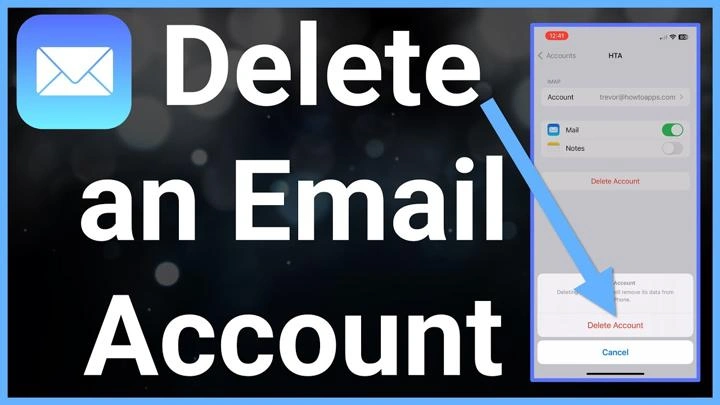
How to Delete Email Address From iPhone
People often mean:
removing account from Mail app.
Steps
- Open Settings
- Accounts
- Select account
- Delete Account
Easy honestly.
Deleting Email From iPhone Delete Entire Account?
Usually no.
It normally only:
- Removes email from phone
- Stops syncing
The actual account still exists online.
How to Delete Email Address From Android
Usually similar.
Steps
- Open Settings
- Accounts
- Select email account
- Remove Account
Done.
Why Old Email Addresses Keep Appearing
Very common frustration honestly.
Usually caused by:
- Autofill memory
- Cached contacts
- Browser history
- Synced accounts
Email apps remember a lot.
How to Clear Saved Email Suggestions in Browsers
Browsers often save emails too.
Especially:
- Chrome
- Edge
- Safari
Usually fixed through:
- Autofill settings
- Clearing saved form data
Can You Delete Someone Else’s Email Address From Your Inbox?
Not really.
You can:
- Delete conversations
- Remove contacts
- Block sender
But emails already received usually stay unless deleted.
Difference Between Blocking and Deleting
People confuse these constantly.
Delete
Removes existing emails or contacts.
Block
Stops future messages from appearing normally.
Big difference honestly.
Should You Backup Emails Before Deleting Accounts?
Absolutely yes.
Very important honestly.
Especially if account contains:
- Receipts
- Photos
- Work files
- Personal memories
- Important logins
Best Ways to Backup Email Before Deletion
Usually:
- Download data
- Export contacts
- Save attachments
- Use backup email
Smart move honestly.
What Happens to Accounts Linked to Deleted Email?
Huge issues people forget constantly.
Many websites use email for:
- Password resets
- Login verification
- Security alerts
Delete email too early?
Could lock you out of accounts.
Common Mistakes When Deleting Email Addresses
People mess this up constantly.
Deleting Wrong Account
Very painful honestly.
Forgetting Password Resets
Suddenly can’t access apps later.
Not Backing Up Emails
Important files disappear forever.
Removing Account From Device Accidentally
People panic thinking everything got deleted.
Deleting Work Emails Prematurely
Can create serious problems.
How Long Deleted Email Accounts Stay Recoverable
Depends on the provider honestly.
Gmail
Often a short recovery period.
Outlook
May delay full deletion.
Yahoo
Usually a temporary grace period too.
After that?
Recovery gets much harder.
Also Read: Can People See When You Forward an Email? Here’s What Really Happens
Can Someone Reuse Your Deleted Email Address?
Sometimes eventually yes depending on provider policies.
Which is why deleting old email accounts permanently deserves careful thought honestly.
Best Practices Before Deleting Any Email Address
Want safer cleanup?
Do this stuff.
Backup Important Data
Always take the first step honestly.
Change Login Emails on Websites
Before deleting old addresses.
Notify Important Contacts
Avoid confusion later.
Double-Check Which Account You’re Removing
Very important.
Understand Difference Between Removing and Deleting
Huge difference honestly.
FAQs About Deleting Email Addresses
Can you delete an email address?
Yep, absolutely.
Does removing email from the phone delete the account permanently?
Usually no.
Can deleted Gmail accounts be recovered?
Sometimes temporarily.
Why do old email suggestions still appear?
Usually autofill or cached contacts.
Can deleting email affect other accounts?
Definitely yes.
Is removing an Outlook account the same as deleting it?
Nope. Usually just disconnects it from the app.
Can blocked emails still appear?
Sometimes inside spam folders.
Should I backup emails before deleting the account?
Absolutely yes honestly.
Deleting an email address sounds simple until you realize there are actually several different things people mean by it.
Sometimes you just want to:
- Remove autofill
- Delete contacts
- Disconnect old accounts
Other times you’re permanently deleting entire email accounts forever.
And honestly?
That second one deserves way more caution than people think.
Because once email accounts disappear:
- Password resets break
- Old messages vanish
- Linked accounts get messy
- Recovery becomes difficult
So before deleting anything important…
Always double-check exactly what you’re deleting first.
